

Skip the $600 Mac mini. Run OpenClaw securely on a remote box.
The setup, the gotchas, and three Claude Code skills that do the install for you in 30 minutes

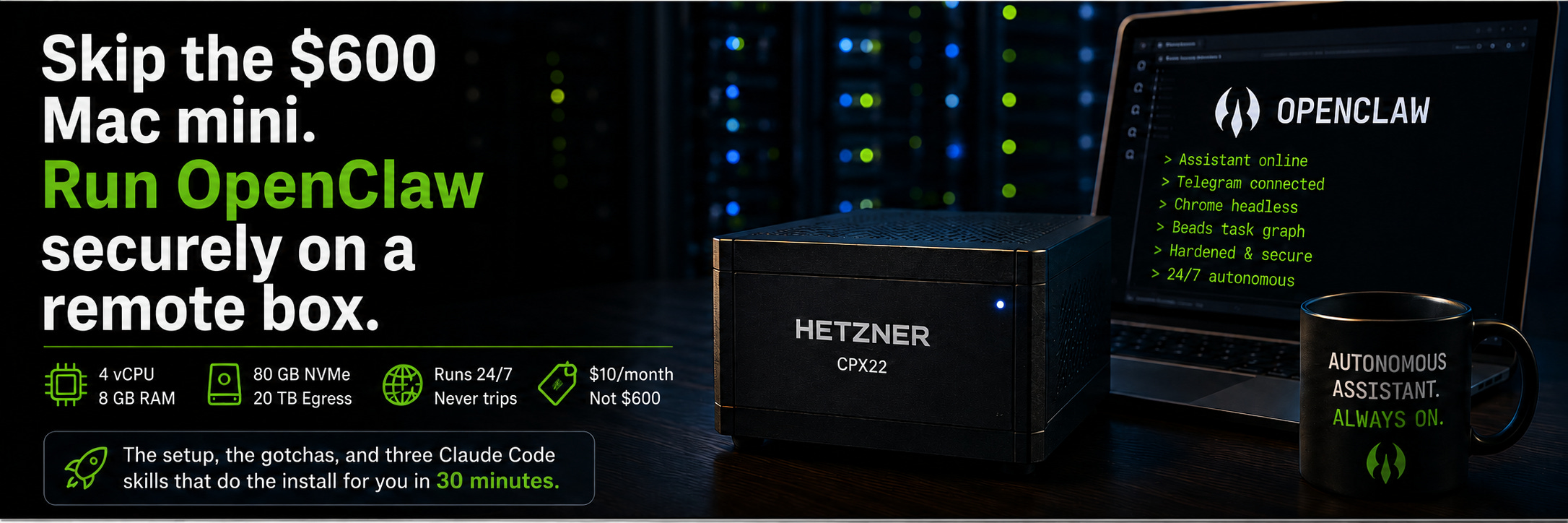
The standard advice for running an OpenClaw assistant is to plug a Mac mini into the wall and let it run. That works. It also costs $599 up front, lives on your desk, eats electricity, and shares a power outlet with whatever else you have plugged in. When your housemate trips a breaker, your assistant goes down too.
A Hetzner CX22 is $10 a month, has 4 vCPUs, 8 GB of RAM, 80 GB of NVMe, and 20 TB of egress. It lives in a German or Virginian datacenter, runs on three-phase power with redundant feeds, and has never tripped a breaker because of laundry. The Mac mini is faster at single-thread bursts. But for a workload that is mostly waiting on API calls, network, and a Chrome process that idles at 200 MB of RAM, you will not feel the difference.
What you will feel is the $480 in your pocket after a year, and an assistant that does not stop when you close your laptop lid.
This is a full setup guide. We will go from nothing to a hardened server running OpenClaw, a Telegram-routed agent, a headless browser stack, a beads task graph, and Git-backed dotfiles that you can replant on any new box in under thirty minutes.
You just need to invoke three Claude skills
What you will end up with
A Hetzner CPX22 running Ubuntu
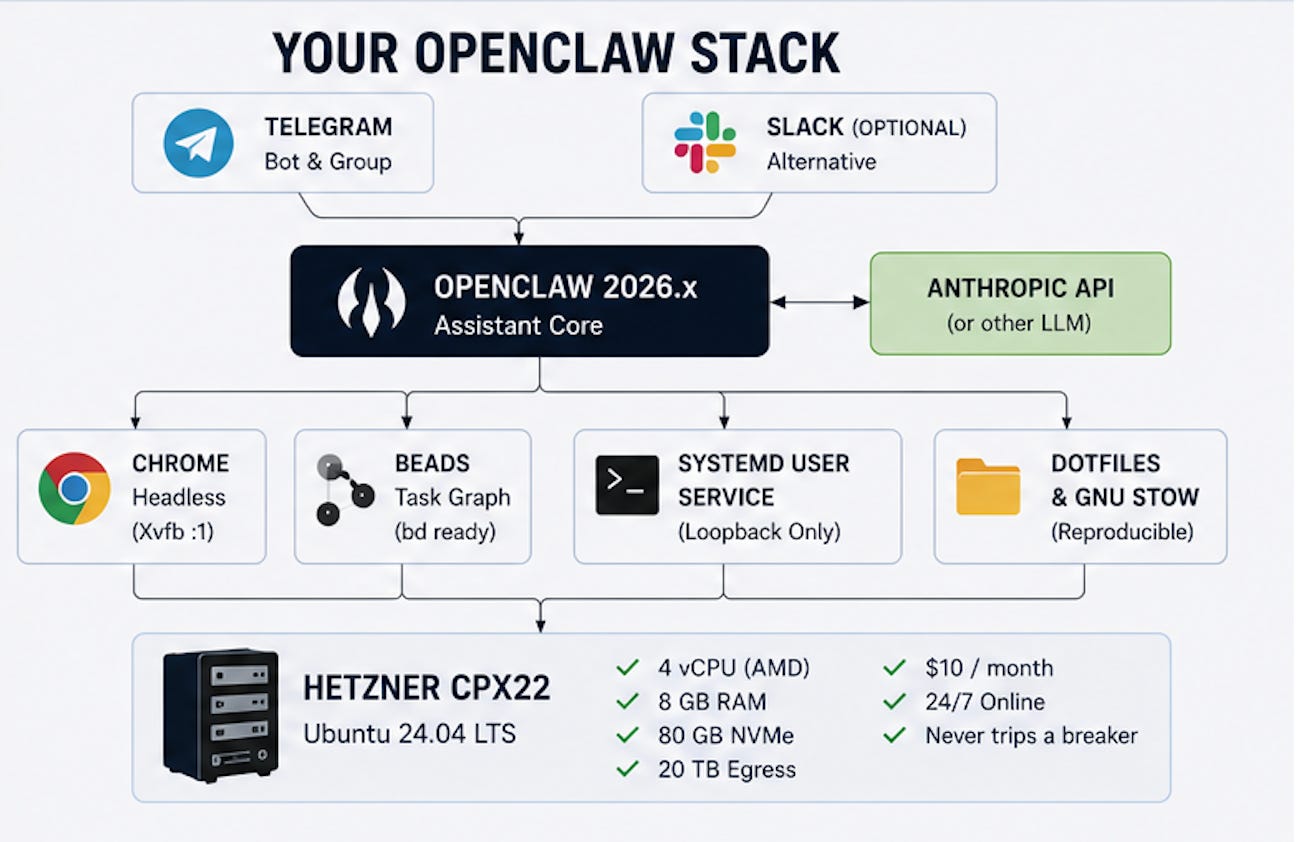
OpenClaw 2026.x as a systemd user service, bound to loopback, reached over SSH
A hardened SSH baseline: key-only auth, optional TOTP, UFW rate-limiting, fail2ban, sysctl tuning, unattended security updates with auto-reboot
Anthropic API access wired in (easily substitute for other inference providers)
A Telegram bot delivering messages to a specific group, routed by binding rules
Xvfb plus Chrome on display
:1, with VNC and noVNC available over SSH for the rare moments you need to click somethingBeads installed as the agent task graph
A GNU Stow-managed dotfiles repo so the whole thing is reproducible
Cron jobs running on your timezone
Total monthly cost: $10/month for the server, plus whatever you spend at the Anthropic / OpenAI / Gemini / other inference provider console.
Prerequisites
An Anthropic API key with a per-month spend cap configured
A Telegram account (or use Slack instead)
An SSH keypair on your laptop (
ssh-keygen -t ed25519if you do not have one)A GitHub or GitLab account for your dotfiles repo
A phone with an authenticator app (Authy, 1Password, Google Authenticator), optional but recommended
A domain is not required. We are not exposing anything to the public internet.
The three skills
The execution is automated in three Claude Code skills. Clone this repo - openclaw-remote-setup . Invoke them in order:
/openclaw-prereqsinstalls Node 24 and beads, initializes the shared task graph/openclaw-hardenlocks the box down and walks through credential decisions/openclaw-installinstalls OpenClaw and everything around it
Each later skill is gated on a beads completion marker from the previous one. You cannot run harden without prereqs, you cannot run install without harden. Order is enforced by data, not by convention. The skills live at ~/.claude/skills/openclaw-* and deploy via GNU Stow from your dotfiles repo, so a new box is git clone && stow && /openclaw-prereqs away from running.
Phase 1: Spin up the box
Hetzner Cloud, new project, attach your SSH public key, create a CPX22 with Ubuntu 24.04 in Falkenstein or Ashburn. The box is up in about fifteen seconds, which still feels rude to anyone who remembers physical servers.
SSH in as root, install Claude Code (npm i -g @anthropic-ai/claude-code after Node, which the skill will install in a moment, or via your preferred package manager). Then run:
/openclaw-prereqsThis installs Node 24, beads, and jq, then creates two shared state objects: a beads database at /root/.claude-bootstrap/.beads, and an inputs file at /root/.openclaw-bootstrap-inputs.json (chmod 600). When the skill finishes, a prereqs-complete issue is closed in beads. The next skill checks for it before running.
Why beads first
How to Fix Your AI Agents That Keep Cutting Corners by Rahul Subramaniam makes the structural argument: models predict completions, so a fourteen-step process becomes a nine-step process if nothing prevents it. No amount of bold text in the prompt fixes this, because it is a property of how transformers work, not a property of how stern you sound.
Beads is the prevention. Every step in the next two skills is a graph node, blocked-by its predecessors, unable to close without a recorded validation reason. The agent picks the next runnable step via bd ready rather than scanning a checklist and convincing itself the work is done. This is the difference between an assistant that runs end-to-end and one that quietly skips fail2ban because the install vibes acceptable by step seven.
Phase 2: Lock it down
/openclaw-harden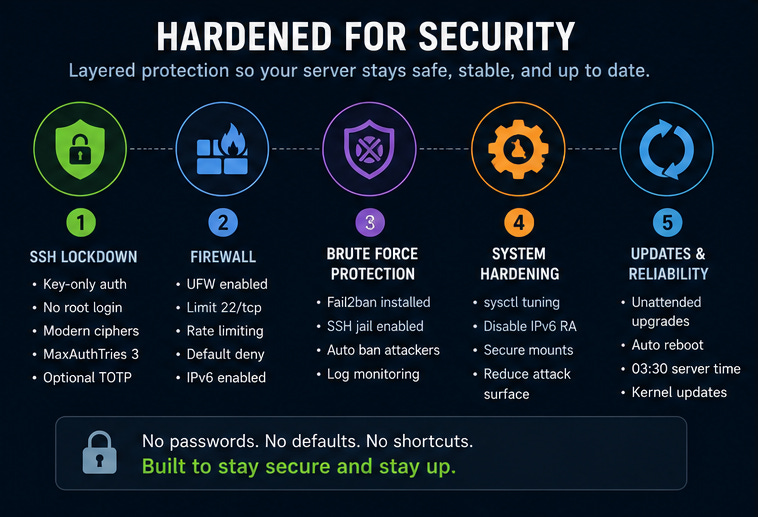
Ten sub-steps, all tracked in beads, each validated before closing. The skill installs and configures, in order:
unattended-upgradeswith auto-reboot at 03:30 server time. Theupdate-notifier-commonpackage is what makes reboots actually fire; without it, kernel updates install but the box keeps running the old kernel until you log in.ufwwithlimit 22/tcp.limitrate-blocks any source IP that exceeds six connections in thirty seconds. This kills most brute-force scanners with one rule.A non-root user that owns everything from here.
sshdwith modern KexAlgorithms, Ciphers, and MACs,MaxAuthTries 3,AllowUsers <user>, no root login, no passwords. Validated withsshd -tbefore every reload. The skill blocks on user confirmation of a second SSH session before continuing, because every locked-out admin has the same story.fail2banwith a local jail. Never edit/etc/fail2ban/jail.confdirectly; it gets replaced on package updates and your changes vanish.sysctltuning: rp_filter, syncookies, no source routing, no ICMP redirects,kernel.yama.ptrace_scope=2,kernel.kptr_restrict=2.Optional TOTP MFA via
libpam-google-authenticator.loginctl enable-lingerso user services run when you are not logged in.
Each piece has a known failure mode. The skill catches all of them and refuses to silently continue. If you want the exact commands, they are in the SKILL.md. The article does not repeat them because the article cannot run them.
Phase 3: Credential blast radius
The harden skill ends with a structured conversation, not commands. The framing is Taleb’s: avoid moves that can take you to zero. The server is replaceable. The credentials you put on it are not.
The skill captures four decisions:
Dedicated bot Gmail, not your personal one. The OAuth scopes that OpenClaw skills request, covering Drive, Mail, Calendar, and Docs, are broad. An agent bug or a prompt injection from a poisoned email can move, share, or delete content from any of them. The safe pattern is a sandboxed bot Google account that owns one shared Drive folder, one shared calendar, and a mailbox you do not care about. Lose those, you lose drafts and bot-scheduled events. Lose your personal Gmail, you lose ten years.
Dedicated handles on every social platform. An automation-flagged X reply suspends the account that posted it. Suspend a personal handle and the support flow is a black hole. Suspend a six-month-old bot handle and you lose a few hundred followers and an afternoon.
Hard monthly spend caps on every API key. A runaway loop burns through a thousand dollars in an afternoon, and the bill arrives at the end of the month when you cannot rewind it. Set the cap in the Anthropic console before the API key ever touches the box.
Never on this box. Production SSH keys, banking credentials, wallet seed phrases, password manager exports, AWS root keys, GCP owner credentials, personal MFA backup codes. For every credential you are about to drop onto the server, ask “if a stranger had this for ten minutes, what would I lose?” If the answer is anything you cannot afford to lose, it does not go on the box.
The skill records each answer in the inputs file, and the final audit reads them back so the decisions are visible at the end.
Phase 4: Install OpenClaw
/openclaw-installTen more tracked sub-steps. The high points:
Claude Code and the
cc-openclawskills stowed into the target user’s home. The skills are what stop Claude Code from reinventing your file layout every Tuesday.OpenClaw via
npm install -g openclaw@latestandopenclaw onboard --install-daemon. The skill insists on127.0.0.1binding; the gateway has no TLS by default and lives behind the SSH tunnel.Secrets in
~/.openclaw/.envchmod 600, sourced by the systemd unit viaEnvironmentFile=, referenced by${ENV_VAR}placeholders inopenclaw.json. The Anthropic key is captured viaAskUserQuestionand never echoed back beyond a prefix-and-suffix confirmation.Telegram bot via BotFather, with the privacy-mode gotcha called out. Switching
/setprivacyoff does not apply retroactively to groups the bot has already joined. Either re-add the bot or promote it to admin. Cost me an hour the first time, undocumented everywhere.Xvfb plus Chrome on display
:1. Headless Chrome gets flagged by X, LinkedIn, and Instagram within minutes. A virtual framebuffer with a real Chrome binary passes every fingerprint check. About 200 MB of resident RAM, which on an 8 GB box is rounding error.Runtime beads at
~/.openclaw/workspace/.beads, separate from the bootstrap database, withBEADS_DIRset in.env. OpenClaw agents use this database for their own task graphs once OpenClaw is running.GNU Stow dotfiles with a deploy key dedicated to the repo. The skill scans the staged diff for known secret prefixes (
sk-ant-,GOCSPX-,ghp_,xoxb-,AKIA) before any commit, and never auto-pushes. It also handles the stowed-skill gotcha: OpenClaw refuses any skill whoseSKILL.mdis a symlink, so the config points OpenClaw at the real path viaskills.load.extraDirsrather than symlinking.SSH tunnel instructions for your laptop.
LocalForward 18789 localhost:18789in~/.ssh/configis all you need.One first cron job scheduled in your timezone.
A sixteen-check audit that reverifies the hardening and the install state. Anything that fails surfaces clearly; the install-complete marker only writes if everything passes.
What you now have
For $10 a month: an assistant that runs while you sleep, drives a real Chrome session that does not get bot-flagged, is reproducible from a Git repo in under thirty minutes, locked behind your SSH key, optionally TOTP-second-factored, rate-limited at the firewall, kernel-tuned, and walled off from anything you cannot afford to lose. The Mac mini is faster at single-threaded bursts. It also costs $599, sits on your desk where any housemate with idle hands can poke at it, and dies when the power blinks.
The skills are the point. Three slash commands turn a four-hour tutorial into a forty-minute install, and every step closes with evidence in beads so you can audit what the agent actually did rather than what it thought it did. The boring parts are what make this work in production.
Now close the SSH tunnel and let the claw do its job.
Recommended reading after you install OpenClaw:
Managing OpenClaw with Claude Code by Rahul Subramaniam (Group CTO - Trilogy & ESW Capital)
Why Your AI Agents Skip Steps - and How Task Graphs Prevent It by Rahul Subramaniam
Manage OpenClaw memory successfully - by Stanislav Huseletov (VP - Trilogy AI COE)
Some folks asked why I picked Hetzner, and the answer is - mainly for cost efficiency. This would work just as well on any other Cloud.
DigitalOcean: Basic Droplet (4 GB / 2 vCPU) $24/mo
Amazon Web Services: AWS Lightsail (4 GB / 2 vCPU) $20–24/mo
Google Cloud: E2-medium equivalent ~$27–30/mo