

[Workshop] Cursor Engineer Explains Zero-Touch Engineering
March 12 Office Hours Recap Part 2: Anysphere Team showcases Cursor Automations, Custom Skills, IntelliJ Integration, end-to-end Jira pipelines, PagerDuty root-cause agents, and Private Workers

This week, the Anysphere engineering and go-to-market team joined the AI Center of Excellence to demonstrate how to move past basic autocomplete and treat Cursor as a full-scale enterprise orchestration engine.
For those who missed the session, the overarching theme was automation and delegation. We unpacked the exact mechanics behind building autonomous Cloud Agents, transitioning away from legacy workspace rules, and executing code securely on private infrastructure. Here is the technical breakdown to help you implement these workflows today.
Want to get more Cost Saving related insights? Check out Part 1 of the Workshop:
1. Mastering Custom Skills & The /do_ticket Pipeline
To truly master Cursor, you need to understand the architectural difference between Sub-agents and Skills.
Sub-agents act as “nouns” or specialized personas (e.g., a “Code Explorer”) with their own isolated context windows.
Skills act as “verbs”—they are repeatable instruction recipes that dictate a specific sequence of actions.
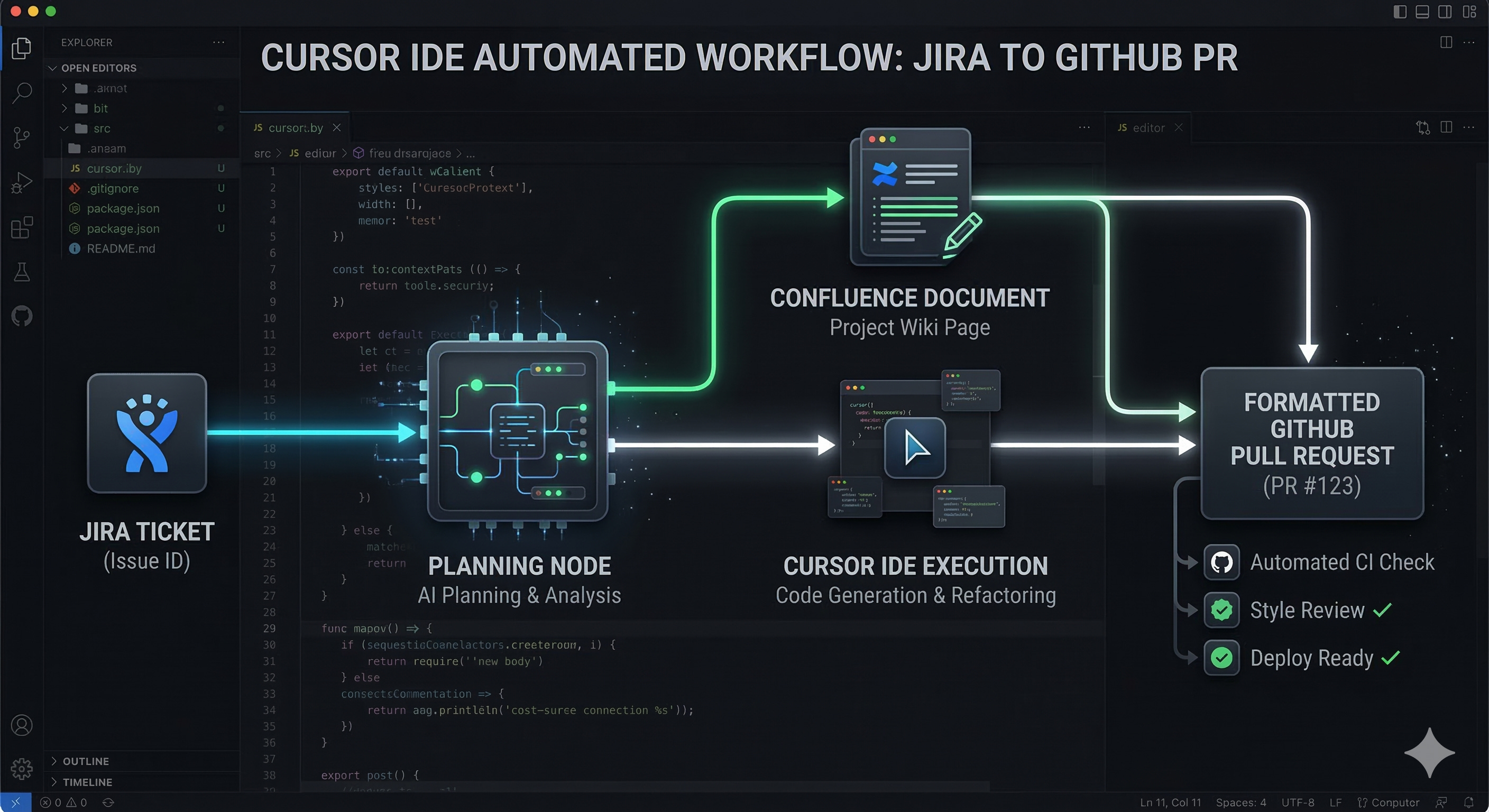
Amrita, the Cursor Engineer leading the session, demonstrated a custom /do_ticket skill that executes a flawless, zero-touch pipeline without human intervention.
The /do_ticket Workflow:
Ingest: The skill uses the Atlassian MCP (Model Context Protocol) to read the specific requirements of an assigned Jira ticket.
Plan: It generates a step-by-step implementation plan and automatically publishes that document directly to Confluence to ensure your team has architectural documentation.
Execute & Chain: It checks out a new feature branch, writes the code, and then chains a secondary, pre-built skill called
/organize_pr_commits. This secondary skill formats the commits properly and opens the pull request for human review.
Alpha for Building Reliable Skills:
Because LLMs are inherently non-deterministic, Cursor might not always know exactly when to trigger your skill automatically. To make your skills bulletproof:
Hardcode Triggers: Explicitly write trigger conditions into the skill’s markdown description (e.g., “Run this skill anytime you see the words ‘new developer’ or ‘onboard’”).
Include Anti-Patterns: Agents respond exceptionally well to contrast. Always include examples of a “good” output and a “bad” output directly in the skill prompt so the LLM understands the boundaries.
Keep it Brief: Never let a single skill exceed 400-500 lines of instructions. If a workflow requires more complex logic, break it down and have one skill call another skill or delegate to a sub-agent.
2. Migrating Legacy “Rules” to “Skills”
If you have been using Cursor for a while, you likely have a .cursorrules file packed with global instructions. A major architectural shift in Cursor is moving away from these bloated workspace “Rules” in favor of hyper-contextual “Skills”.
The Best Practice:
Rules should now be treated as strictly binary: they are either “all or nothing”. For example, “always apply standard Prettier formatting” is a valid rule.
However, if you have complex rules configured to be “applied intelligently” by the LLM based on the situation, you are bloating your context window unnecessarily.
The Fix: Cursor provides a built-in
Migrate to Skillscommand in their official documentation. This command automatically converts your legacy “intelligent” rules into the new, modular Skills format so they are only loaded into context when explicitly needed.
3. Automations: Webhooks and the PagerDuty Root-Cause Agent
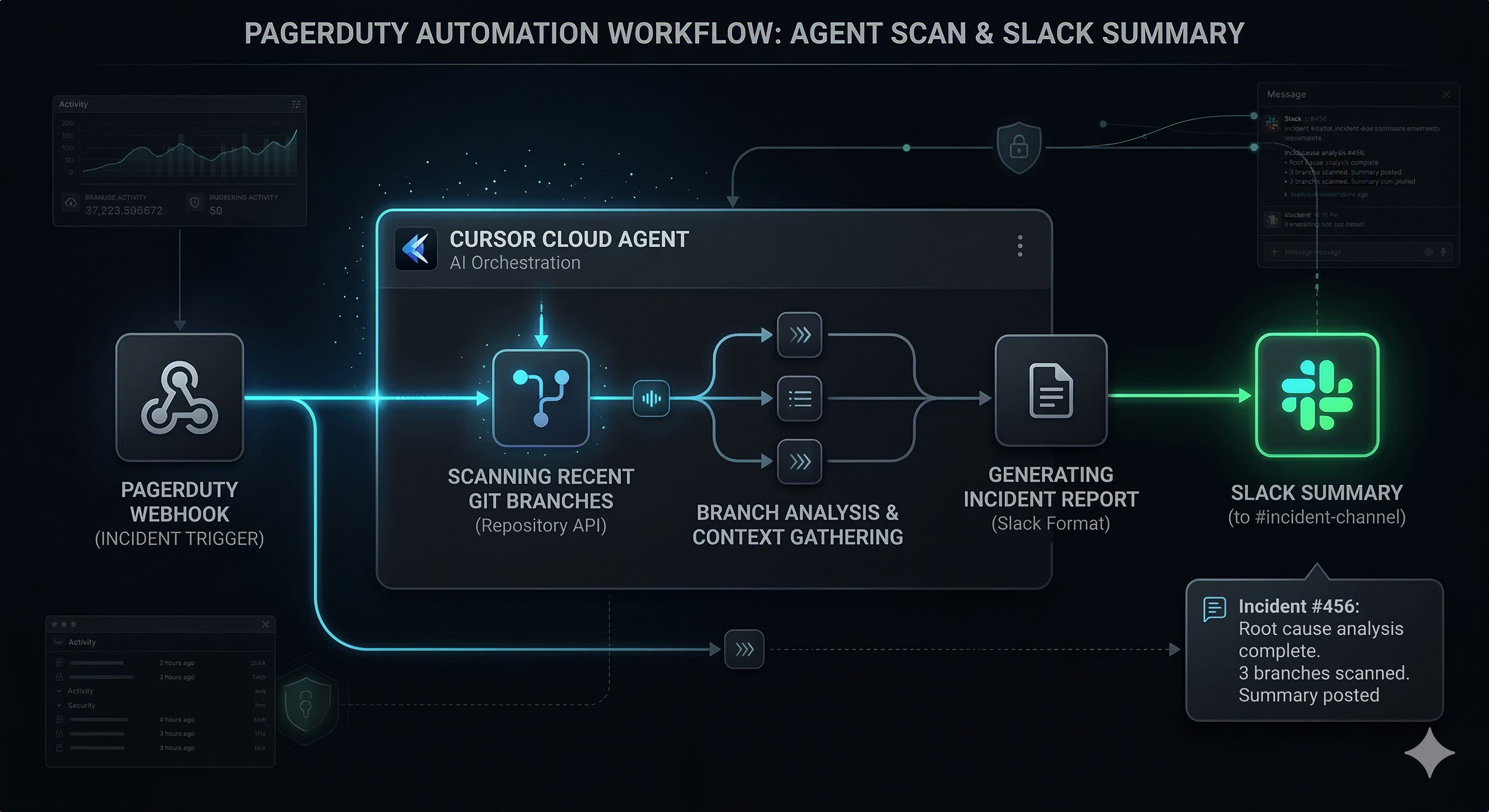
If Skills are on-demand verbs you trigger in a chat window, Automations are background Cloud Agents driven entirely by CRON schedules or Webhooks. This is where Cursor achieves true zero-touch engineering, operating independently of your local IDE session.
Practical Workflows:
Scheduled Reporting (CRON): You can configure an Automation to run every day at 9:00 AM. The Cloud Agent spins up in the background, queries the Atlassian MCP to read the Grafana Jira board, and posts a formatted Slack summary of all open tickets—costing you zero manual effort.
Incident Response (Webhooks): Instead of waking up to blindly debug a critical failure at 3 AM, set an Automation triggered by a PagerDuty incident webhook. Before you even open your laptop, the Cloud Agent automatically clones the repo, reviews the last six merged branches, and attempts to isolate the root cause of the SEV-1 in production.
4. Enterprise Tooling: Private Workers & IntelliJ ACP
Security and legacy environments are the two biggest hurdles to AI adoption. The Anysphere team introduced us to two infrastructure updates designed specifically to solve these enterprise roadblocks.
Private Workers (Beta): Previously, Cloud Agents ran exclusively on Cursor’s cloud infrastructure, which posed a severe security and compliance concern for highly sensitive, proprietary codebases. A massive new toggle called “Use private worker” solves this. You can now configure Cursor to execute Cloud Agents directly on your own local machines or internal AWS VPCs, ensuring your code never leaves your private environment.
IntelliJ Integration: Cursor is now natively available inside IntelliJ via the ACP protocol. Java developers no longer have to choose between advanced AI and their preferred IDE. You can maintain IntelliJ’s powerful LSP, heavy compilation environments, while utilizing Cursor’s AI chat and semantic codebase indexing in the exact same window.
5. Third-Party Plugins & Marketplace
Cursor has transitioned from just hosting raw MCPs (which are essentially just API data pipes) to supporting fully packaged Plugins.
A Plugin is a bundled combination of MCPs, custom Skills, and specialized Sub-agents published directly by third-party vendors.
The Marketplace just added 30 new plugins, including official, highly optimized integrations from Figma, Datadog, and Atlassian.
Auto-Updates: These integrations are dynamically linked. When Figma updates their API, they update their plugin repository, and your local Cursor client automatically inherits the new API capabilities and skills without you needing to manually configure anything.
Resources:
Google Workspace CLI: Use this MCP to allow Cursor to read/write to your Google Docs, Calendar, and Sheets.
Cursor Settings -> Marketplace: Check your settings to install 3rd-party packaged plugins or build your own internal company marketplace.