

We Turn an Article Into a Narrated Video in the Time It Takes to Render (Part 1)

Here's the thing I can do now that I couldn't a month ago: open one of our own Substack articles, click a button, walk through a short interview, and a few minutes later get a finished explainer video that actually looks like that article, its argument, its tone, its palette, not like every other video we've ever made.
That's the promise. This is the honest version of how we got there, including the part where it wasn't perfect out of the gate.
The pivot that made it work was subtractive: three weeks ago every explainer video our platform produced looked the same, so we deleted 455 lines of code and let the model author each video from scratch instead of filling in a template. Here's why we did it, and what it bought us.
Context
Amplifier is an internal tool the Trilogy AI CoE team uses to generate multimedia content for our Substack articles - infographics, carousels and the bit this story is about, 30-to-90-second explainer videos. Pick an article, answer a short interview (goal, audience, narrative style, aspect ratio, voice on/off, duration), and a few minutes later you get an MP4 you can post.
The rendering itself runs on Hyperframes, an HTML-and-GSAP video runtime. (I prototyped the earliest versions in Remotion, the React-based framework; but I moved to Hyperframes because a composition is a single self-contained index.html driven by data-* attributes — which, as you'll see, turns out to be exactly the surface an LLM can author end to end.)
When we first shipped the explainer video pipeline in mid-May, the architecture looked sensible on paper:
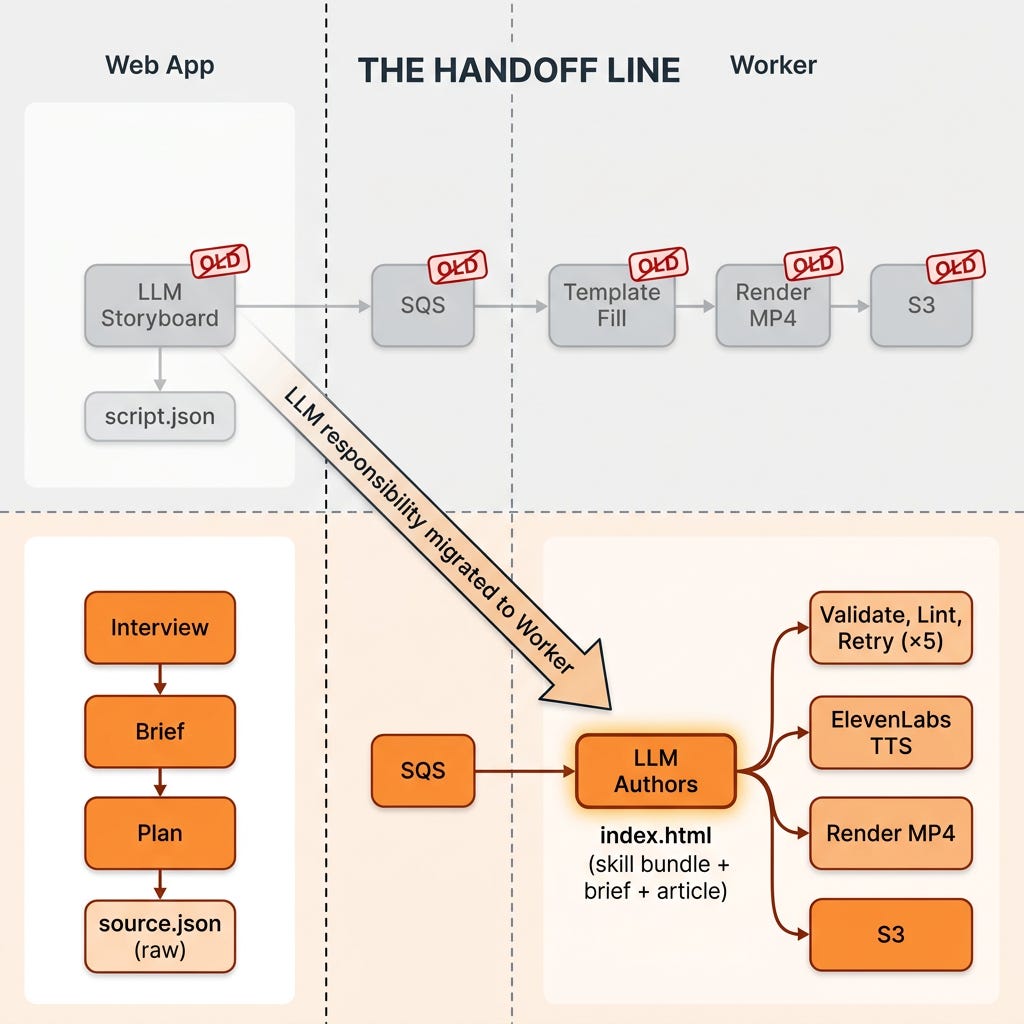
Web app runs the interview, then calls an LLM (
generateExplainerScript) to plan the video. The LLM returns a structured "storyboard" — five or six scenes, each with aneyebrow,title,body,highlight,supportingPoints, and narration. Web app uploadsscript.jsonto S3 and enqueues a job.Worker (a separate service that lives alongside our Hyperframes packages) picks up the job, walks the storyboard, and assembles an HTML composition using a hard-coded template (
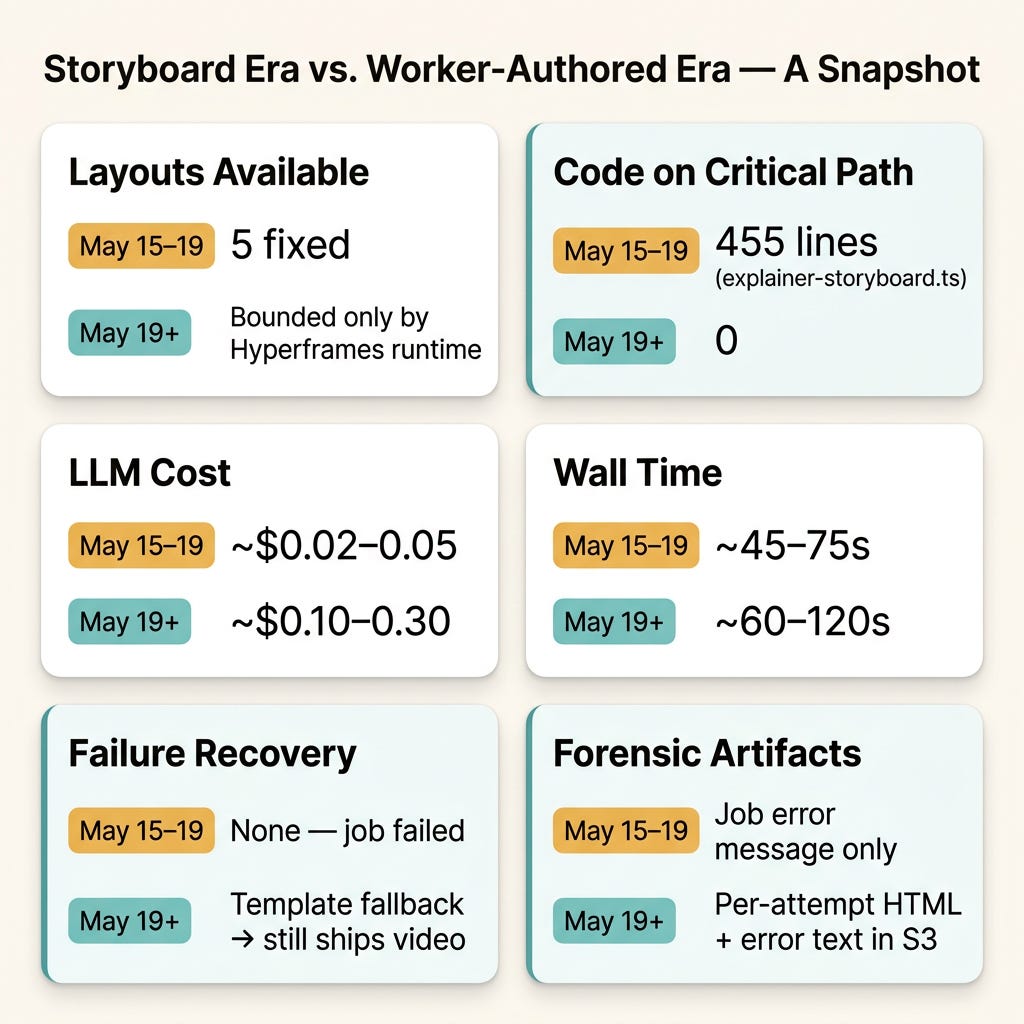
buildHtmlTemplate) with one palette family, five fixed layouts (hero / split / quote / author / cta), and identical GSAP entry and exit animations on every scene.Renderer turns the HTML into an MP4 via Hyperframes.
The split, web app does creative planning, worker does mechanical assembly, felt clean. It also produced uniformly mediocre videos.
Timeline: May 15 (storyboard ships) → May 19 (storyboard deleted). Four days.
Team: One engineer plus a pair-programming agent.
Constraint we'd self-imposed: keep the worker simple, string substitution, nothing more.
The Objective
Every video for every article had the same five layouts in the same order with the same motion. A piece on "what AI agents got right at DevDay" looked indistinguishable, frame-for-frame, from a piece on a quarterly earnings recap. Only the strings changed.
We had a quality bar, and it was set by hand. When one of us authored the same kind of video locally, Claude Code sitting inside our hyperframes repo with the bundled authoring skills, each result was bespoke. Different layouts, custom motion graphics, palette choices that matched the article. That output didn't look generated; it looked made. We wanted production output to clear the same bar, not the template grid.
We articulated the objective as:
Replace the template-fill rendering path with an LLM-authored composition pipeline that matches the quality of local Claude Code authoring. Each video should be a fresh composition tailored to its article, not a template re-skin.
The Approach
What We Tried First (and Why It Failed Quietly)
The original storyboard module did exactly what the spec asked for: prompt the LLM, parse JSON, hand the worker a sequence of scenes to render. It was about 455 lines of careful work — sanitization of Substack boilerplate, JSON-fence stripping, structured outputs, fallback kinds, a separate token-burn pass to keep costs from spiking.
But it had a structural ceiling baked in. The LLM only filled in strings. Layout was the worker's call. Color was the worker's call. Motion was the worker's call. Composition was the worker's call. The model had no authority over the parts of a video that make videos feel different from each other.
We discovered this two ways. First, we watched a stream of outputs and could not tell them apart from across the room. Second, when we hand-authored a video locally, the result was visibly better in a way no amount of template-tuning could close. The template wasn't a starting point we could improve; it was a ceiling.
There's a quiet trap here worth naming: structured outputs make it easy to give the LLM a narrow surface ("fill in these six string fields per scene") because the JSON schema becomes the spec. The schema is also what locks the ceiling in place. Every constraint you bake into the schema is a creative choice you've taken away from the model.
The Pivot
We moved composition authoring out of the web app entirely. The worker became responsible for composing and rendering, not just rendering. Inside the worker, a render-validate-retry loop drives the LLM to author a complete index.html from scratch, on every job, using the same authoring skills we use locally. The web app stopped calling generateExplainerScript, and we deleted explainer-storyboard.ts.
The architecture flipped:
Key Decisions
Move the LLM call across the network boundary. The worker now reads the user's
aiBaseUrl/aiApiKey/aiModelfrom DynamoDB and makes the call itself. The web app's only job is to assemble inputs and enqueue. This is what unlocks giving the model the whole composition surface, because the worker is the thing that actually needs the HTML. (The pipeline is provider-agnostic, it uses whatever model the user configured in Settings; in our case that's GPT-5, which gets routed through the Responses API.)Give the LLM the same skills we give it locally. We bake
skills/hyperframes/(the 490-line authoring guide),skills/gsap/, and a newskills/amplifier-constraints.md(~30 lines of hard rules: whichdata-*attributes the runtime needs, which CDN URLs are allowed, the audio file path) directly into the worker Docker image. System prompt totals ~25–35k tokens, large, but cacheable per-provider across retries within a job.Build a validate-retry loop with five tries. Per attempt the worker runs JSON-schema parse → string-level HTML sanity checks →
@hyperframes/coreprogrammatic lint → write file → synthesize voiceover → render → post-render sanity check (file > 50KB, duration within tolerance of target). Any failure feeds its own stderr back to the model with the message "Your previous composition failed: \<truncated error\>. Fix the issues and return a new full indexHtml, keep what was working, change only what needs to change." The full conversation history persists across attempts so the model edits in place, not from scratch.Keep the template as a fallback, not a default. The old
buildExplainerScript+buildHtmlTemplatecode stays in the worker for exactly one purpose: if the LLM blows all five attempts, we fall back to it so the user still gets a video. The job gets markedcompletedwith a message annotating the fallback path. This is the unsexy decision that lets you put a creative LLM in the critical path.Failed attempts are forensic, not user-visible. Each failed attempt's HTML and error text upload to
s3://<bucket>/<baseKey>/attempts/attempt-N-*there for postmortem, never surfaced to the user. The successful attempt becomes the job'scomposition.htmlartifact and reuses the existingartifacts.scriptslot in the job record (we changed the UI label, not the storage shape).
What This Cost
These are the planning estimates from the design spec, directionally what we see, not instrumented averages:
Prompt input: ~25–35k tokens per attempt (cached across retries inside a single job).
Output: ~5–15k tokens per attempt.
Wall time with GPT-5 reasoning: ~30–60 seconds per attempt.
Successful one-shot video: ~$0.10–0.30 of LLM cost, ~1–2 min wall time end-to-end.
Worst case (5 attempts → fallback): ~$0.50–1.00, ~4–6 min wall time.
Hard ceiling: 15 minutes of worker time per job. Beyond that we kill the task and mark the job failed.
Two specific risks we accepted:
Render flakiness blamed on the LLM. If Hyperframes itself has an intermittent render bug, we'll burn retries on the model trying to "fix" something it didn't break. Mitigation for v1: the post-render sanity check distinguishes "rendered but blank" (likely LLM problem) from process errors (likely engine problem). Eventually we want different errors to route to different recovery paths; for now they all retry.
Skill drift. The authoring skills are maintained in the
hyperframesrepo. We copy them into the worker package via a manualsync-skills.shscript and bake them into the Docker image. If upstream skills change and nobody syncs, production quality regresses silently. Manual is the right call for v1 because the skills churn rarely, but a CI hash-check is on the to-do list.
Results
What Worked
Videos visibly diverged. A piece on AI agent benchmarks no longer looked like a piece on a quarterly recap. Different palette choices, different scene layouts, different motion, within the same Hyperframes runtime. The quality bar moved from "passable internal demo" to "actually shippable on the company Substack."
The fallback bought us guts. Knowing the template path was still wired in let us push a creative LLM into the critical render path without flinching. If the model has a bad day, the user still gets a (boring) MP4.
Validation feedback closed the loop. When the LLM emits an HTML composition that the Hyperframes linter doesn't like, the linter's stderr is the cheapest, most precise teaching signal we have. Most failures resolve on attempt 2.
Net-negative lines of code in the web app.
explainer-storyboard.tswas 455 lines. The web-app side of the pivot was a 26-line diff inexplainer-video-jobs.tsplus a delete. The complexity migrated to the worker, where it belongs, that's the place that needs to know about authoring constraints, render engines, and validation pipelines.New formats got cheap. This is the dividend that convinced me the pivot was right. Because the worker authors the whole composition instead of filling a fixed template, adding an output format is a prompt-and-constraints change, not a new code path or a new set of layouts. We've since added a square 1:1 format (1080×1080) to the interview for LinkedIn and Instagram feeds, same LLM-authoring pipeline, just told a different frame to fill, and the runtime handles 9:16 vertical too. Under the old template path, every new aspect ratio would have meant re-cutting all five layouts by hand.
What Didn't (Yet)
Token spend per video roughly 5×'d in the typical case (one-shot: ~$0.10–0.30 vs. the storyboard path's ~$0.02–0.05). For an internal team tool generating a handful of videos a day, that's noise. If we ever opened this to external traffic, it would matter. We track it with a
billingSurfaceId="openai:llm-authoring"cost event per attempt so we can see it shift.Cold-cache attempts run slow. ~30–60s for the first LLM call inside a job, dominated by the 25–35k-token system prompt. Retries inside the same job hit the provider cache and run faster. The first job after a provider cache eviction is the slowest path.
A new class of bug we didn't see coming. When you hand the LLM authority over a video's timeline, you also hand it authority over how long the video is. That turned out to be a story by itself, and a quiet failure mode that reached our first published batch before we noticed. That's Part 2.
By the Numbers
Lessons Learned
The shape of the schema is the shape of the ceiling. When you constrain the LLM to "fill in these six fields per scene," you've moved the creative job away from the model and into your code. If the code's creative range is narrower than the model's, you've capped the output before you even called the API. For tasks where bespoke output is the whole point, give the model a bigger canvas, even if it costs more tokens.
Move the LLM next to the thing that consumes its output. The web app called the model, but the worker rendered the HTML. The schema between them (the storyboard) became a creative bottleneck nobody owned. Pushing the LLM call into the worker collapsed that boundary. The general rule: if you find yourself defining a structured intermediate format between an LLM and a renderer, ask whether the LLM should just produce the renderer's input directly.
Validation feedback is the most underrated retry signal. The Hyperframes linter is a deterministic program that knows exactly what's wrong with a composition. Piping its stderr back to the model is the cheapest, highest-bandwidth teaching signal we have. Engine errors > vague human prompts > "try again."
The "boring" fallback unlocks the "creative" default. We could put an LLM in the render path because the template path is still alive behind it. The template doesn't have to be good, it has to be guaranteed. Once the floor is solid, the ceiling can be ambitious.
"At the click of a button" is an engineering claim, not a marketing one. The reason this feels like one click to the user is that everything hard, authoring, validation, retries, fallback, forensics, happens behind the queue. The button is easy because the worker is not.
What's Next
Part 2 covers the bug that nearly invalidated all of this: the LLM faithfully locked every composition's timeline to the target duration we asked for, ElevenLabs cheerfully synthesized 42 seconds of voiceover into a 30-second slot, and the first batch of published videos played their visuals to the end while the narration cut off mid-sentence. A few hundred views before two teammates flagged it. We'll trace the root cause through three files, show the fix (extendCompositionDuration), and talk about what it taught us about authoring autonomy vs. authoring authority.
Takeaways
Production LLM pipelines often fail at the schema, not the model. Audit the schemas you've put between your model and its output.
The line between "the LLM helps" and "the LLM is responsible" is moved by what you let it write, not by which model you call.
Keep a deterministic fallback in the critical path. It's what lets you take real creative risk with the default.
Failed attempts are evidence, not garbage. Archive them.
When you give a model authority over one dimension of an output, audit every other dimension that depends on it.
David Proctor is VP of AI at Trilogy. He writes about AI infrastructure, agent protocols, and what actually works in production.