


For months, higher-context Codex configurations circulated as a simple tweak. I tried them against OpenAI and provider-backed models. They changed settings, but they did not produce working long-context sessions.
The situation changed in August. After a reply about companies choosing Opus for its context window, Tibo Sottiaux, who leads Codex at OpenAI, replied:

The next day he posted the configuration values for a one-million-token window. They were familiar. I had already tried the same configuration months ago and found it didn’t work!
Then came the missing part: a server-side change. Tibo said the 1M path had previously worked only for API keys, and had only NOW been enabled for usage through ChatGPT accounts.

The earlier failures, the model catalog, and my long-context tests explain why this guide needs more than one TOML setting.
Usage warning: Once a request exceeds 272K input tokens, OpenAI charges input at 2x and output at 1.5x for the entire request. The higher rate applies to all tokens in that request, not only the portion above 272K. OpenAI documents this rule on the GPT-5.6 Sol model page.
Set the client configuration
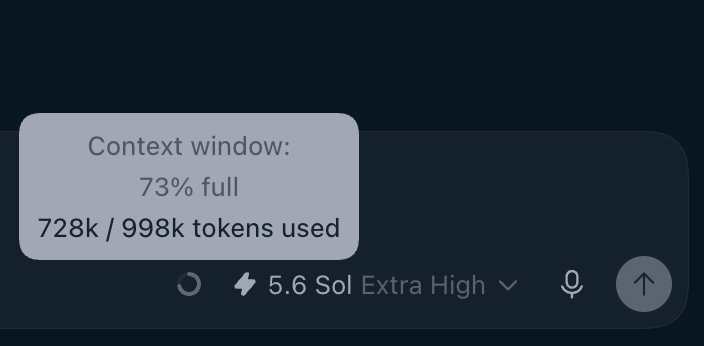
Open ~/.codex/config.toml and choose GPT-5.6 Sol. The server-side path described above now lets a ChatGPT-account session use the higher context capability. These values keep automatic compaction below the intended working range.
model = "gpt-5.6-sol"
model_context_window = 1_050_000
model_auto_compact_token_limit = 900_000
model_catalog_json = "~/.codex/models-1m.json"
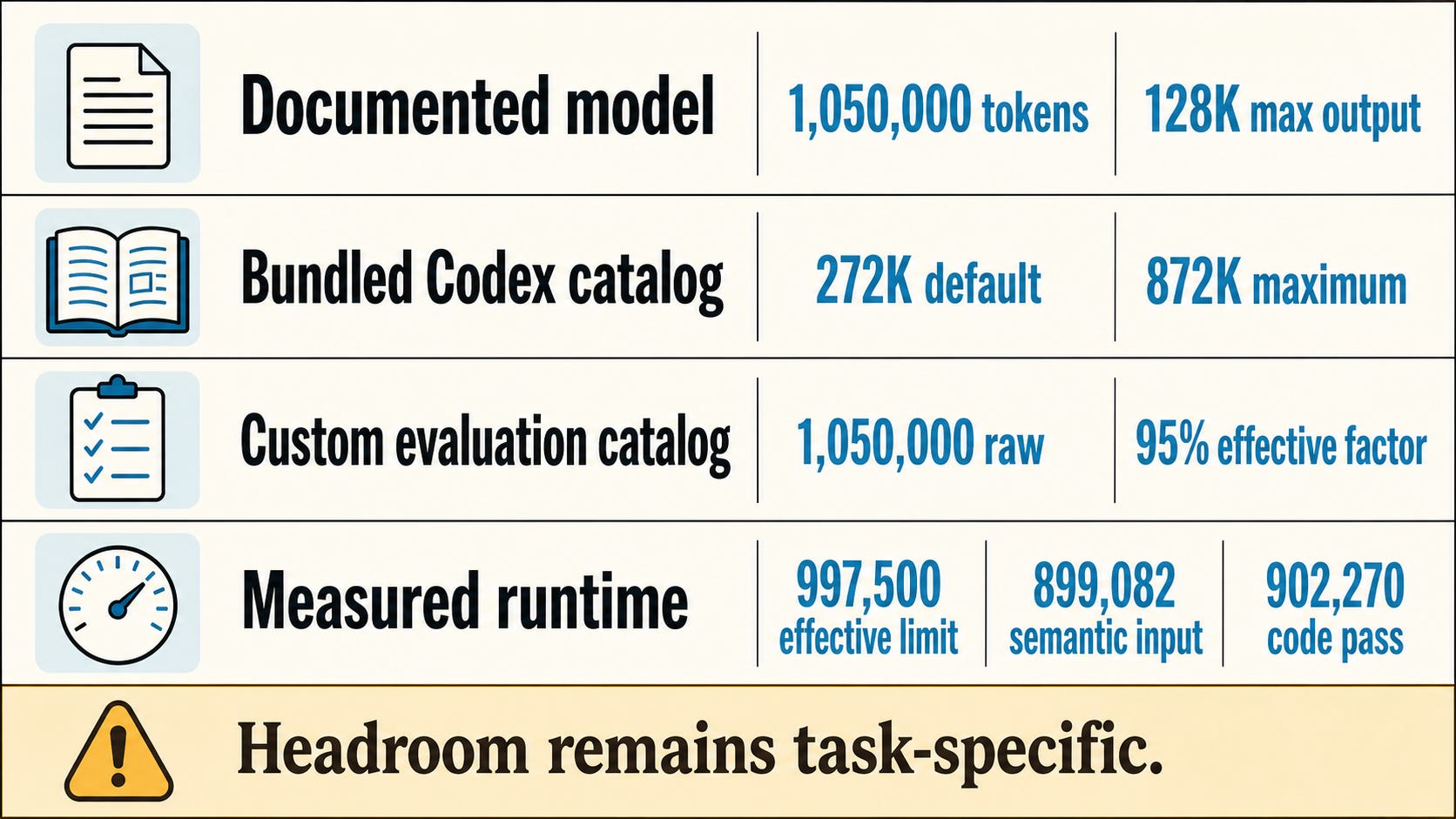
OpenAI documents GPT-5.6 Sol with a 1,050,000-token context window and 128,000 maximum output tokens. The model_context_window setting asks Codex to use that range. It does not remove a smaller ceiling from the active model metadata. A configured value is not evidence that the client accepted it. The extra model_catalog_json line points Codex at a separate catalog file. Use a separate file because the normal cache refreshes. Keep the cache as the input and write the override elsewhere.
jq '
  .models |= map(
    if .slug == "gpt-5.6-sol" then
      .context_window = 1050000 |
      .max_context_window = 1050000
    else . end
  ) | {models}
' ~/.codex/models_cache.json > ~/.codex/models-1m.json
The command preserves the current catalog entries, changes Sol’s two context fields, and removes cache bookkeeping that Codex does not need in the override. Give model_catalog_json the absolute path to the resulting file. Restart Codex, then inspect the active entry:
codex debug models | jq '
  .models[]
  | select(.slug == "gpt-5.6-sol")
  | {context_window, max_context_window, effective_context_window_percent}
'
The target result is 1,050,000 for both context fields and 95 for the effective percentage. Codex applies that reserve for system prompts, tool overhead, and model output. A 1,050,000 raw window therefore gives a 997,500-token effective context limit.
Why the model catalog still matters
OpenAI publishes the model window. Codex resolves a client-side model catalog before it starts a session. At the August 18 evidence cutoff, the repository-bundled Sol entry listed context_window as 272,000 and max_context_window as 872,000. The client code clamped a configured model_context_window to the active max_context_window whenever that maximum was present.
That explains the older configuration failures. The settings existed, yet they did not complete a working long-context session. I followed a comment pointing at the model catalog, built a custom catalog, and could finally make Codex display the larger client window. Later testing exposed the next problem: a larger number in the client did not prove that the server would admit and use that context.
Server-side enablement changed that part. A custom catalog still matters when the bundled maximum remains below the window you want to expose. A usable state needs both pieces: a server route that accepts the context and client metadata that lets Codex request it.
Codex’s configuration reference documents model_context_window, model_catalog_json, and model_auto_compact_token_limit. Its model type uses a 95 percent effective-context factor, and the session code calculates the effective limit from the resolved raw window.
The same change works with third-party models
The catalog mechanism also applies to custom provider model IDs. I switched Codex to Fireworks-hosted DeepSeek V4 Flash 0731, selected the exact Fireworks model slug, and loaded a separate catalog entry with a 1,048,576-token raw window. Codex reported a 996,147-token effective window after its 95 percent reserve, and I loaded the session past 805K active tokens.
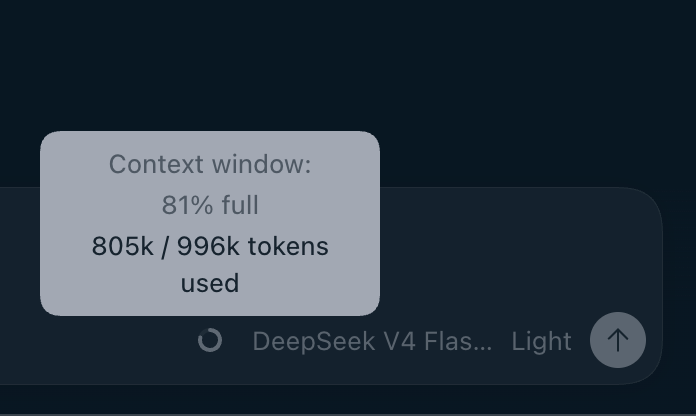
This extends the practical value of the model-catalog investigation beyond Sol. A third-party model with a matching provider route and million-token serving window can expose the same class of Codex session capacity. Each provider and model pair still needs a runtime test because the catalog controls client metadata while the provider controls what its endpoint accepts.
My earlier article, Codex Chat History Disappears When You Switch Providers, explains the Fireworks provider configuration and the local conversation-partition issue that appears when moving between OpenAI and third-party sessions, as well as a simple bridge script solution:
Codex Chats Disappear when Switching Providers

When I switched Codex Desktop to Fireworks-hosted DeepSeek V4 Flash, all my project folders were there, but all the chat conversations were not visible.
Test the session, not the settings
After I made the larger window display, I used persisted Codex sessions to check what the runtime actually accepted. Runtime rollout data, rather than configuration text, determined the effective context window and actual input size.
The retrieval wave completed 70 uncompacted sessions and 350 of 350 questions from 200K through 899K. I then tested reasoning with a 20-hop chain and a ledger that required twenty ordered arithmetic updates spread across the context.
Across five paired seeds at 200K, 450K, and 899K, all 30 reasoning sessions completed without compaction or execution failure and returned the correct result. Each 5-of-5 cell still has a wide 56.6 to 100 percent confidence interval, so this remains a screening result for two synthetic tasks, one model, and low reasoning effort.
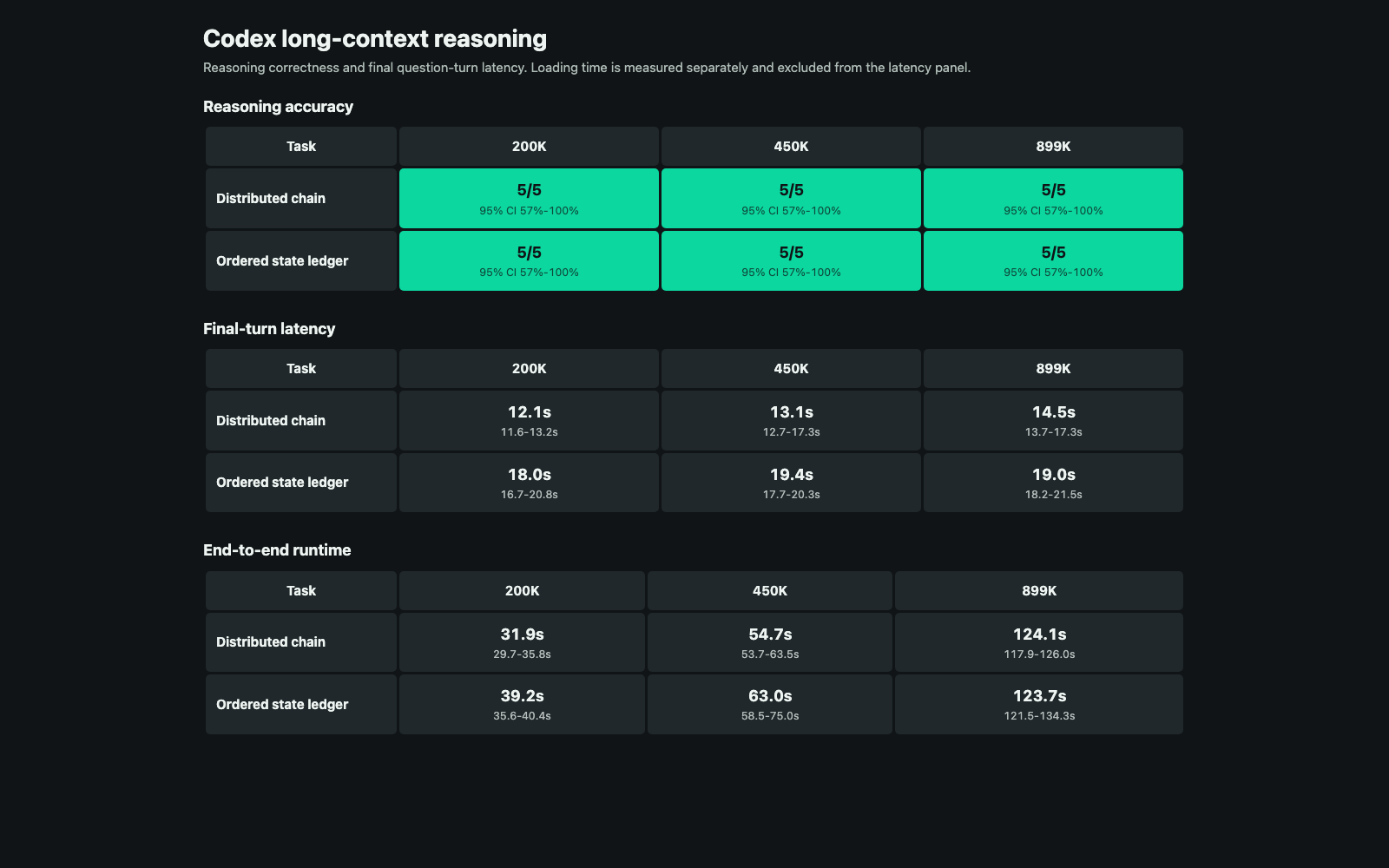
Final reasoning slowed modestly. The chain median rose from 12.1 seconds at 200K to 14.5 seconds at 899K; the ledger moved from 18.0 to 19.0 seconds. End-to-end runtime reached about 124 seconds at 899K because loading grew from two persisted turns to nine.
Tool-using code repair still needed more headroom. Three aggressively sized probes failed near 917K to 921K active input, while a smaller case passed at 902,270. The reasoning summary and full report contain the complete method, ranges, and limitations.
Keep a verification loop
The displayed window establishes available capacity. I compare runtime-reported input with that limit, watch for compaction and failures, and rerun a representative workflow after changing the model, provider, or catalog.
OpenAI’s evaluation guidance recommends representative, repeatable tasks with logged outcomes. The useful operating point depends on how much context the workload loads, which tools it invokes, and whether it finishes reliably.
The code, frozen wave definitions, aggregate results, and interactive visualizations are in my long-context evaluation repository.