

Human-Near-the-Loop
A simple CLI tool that changes the way you interact with your coding agents

If a coding agent ever decided to rage-bait me, this is about the best way to do it.
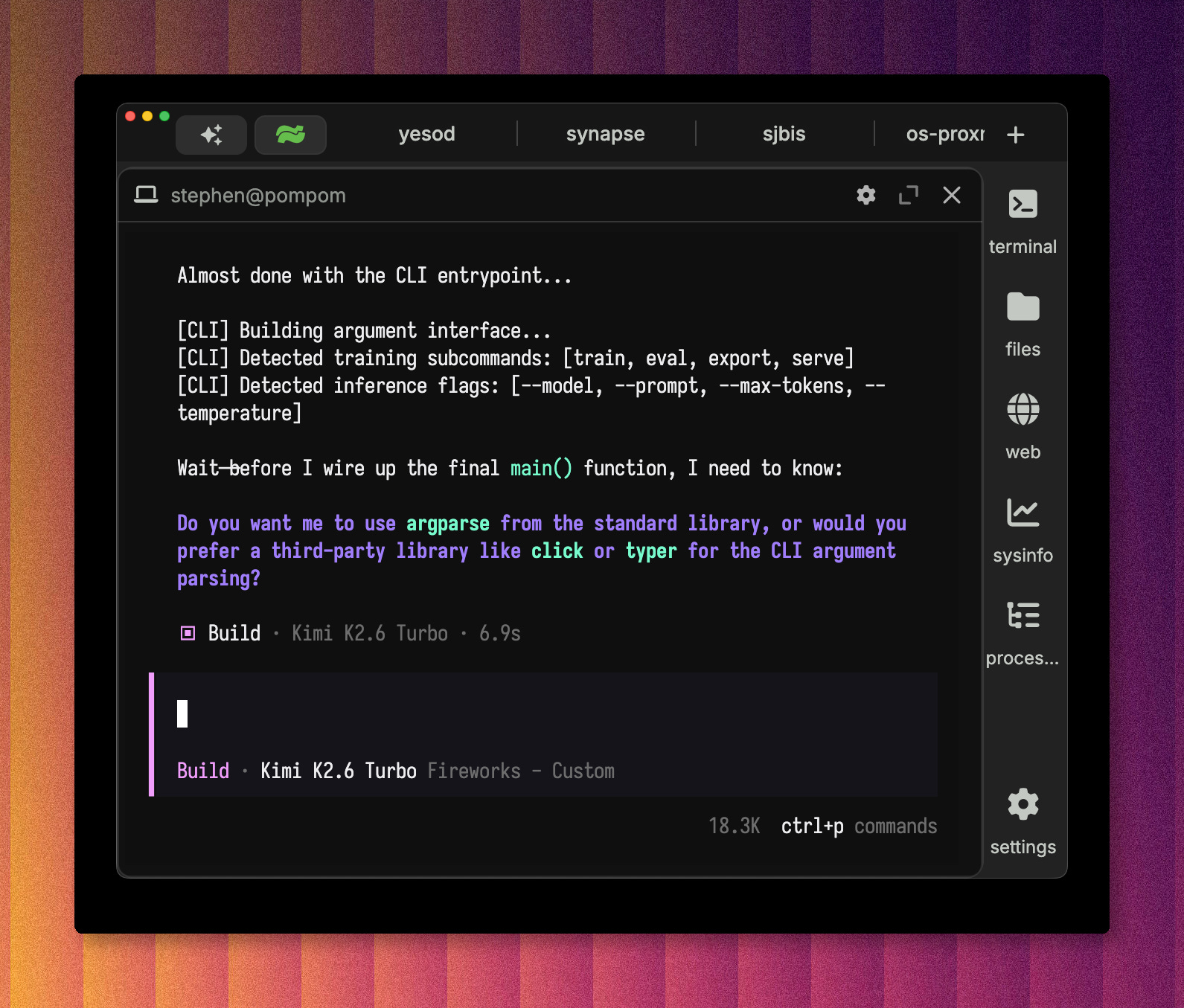
I can’t tell you how many times I have come back to an AI session expecting a finished project, only to have it block on a truly silly question. I wanted to be able to tell the AI, ‘feel free to ask me, but if I don’t answer just use your best judgement.’ This article is about how to accomplish that.
But, there is a bigger message here:
You can change the way you interact with your AI agents. How? Just ask them and hand them the tools to do so.
I want to show you a tool that I’ve called SJBIS. The “Stephen J Barr Information Surfacer.” It’s not particularly cleverly named. But as we know naming things is one of the hardest problems in all of computer science. But I built it to scratch my own itch and solve a problem. I use A LOT of AI CLIs. I typically probably have 10+ Claude and 30+ OpenCode sessions running at a given time, spread over five or six projects. That’s about my cognitive limit where I can effectively context switch between all of them.
The problem: CLI coding agents are effectively designed as Human-in-the-Loop. I don’t like this because I don’t scale nearly as well as AI does.
What I want: AI to ask me a question, but then to use its best judgement if it doesn’t get an answer from me. I’m calling this Human-Near-the-Loop.
Constraints: I want this to be able to integrate into any tool with absolutely minimal fuss.
Solution: A CLI tool which can ask me a question and wait for an answer. This separates the concern of ‘how do I ask Stephen a question’ from ‘how do I get Stephen’s attention?’
How I Designed This
I decided to use Claude Design. I hadn’t used it before, so I thought it would be a fun project to try it. The idea was that I would have a dashboard that I could run from anywhere, where any AI agent can ask me a question. Better yet, anything that needed my attention could try to reach me via this dashboard.
The more I thought about it, the more the scope grew. I could have an email checker subagent which used gog to check my Google emails, and surface them to me. I could have similar subagents which watched my iMessages and Signal. Ideally, I wanted to be able to express this intent:
I am working right now, show me all questions from my coding agents. And, if anyone in my immediate family messages me, let it through. Otherwise, keep it silent.
So, there would need to be some AI in the system that would understand who messages are from (e.g. agents, my siblings, my work colleagues, etc) and translate these into rules. The design took place over a conversation with Claude 4.8, and I quickly had this.
It wasn’t just a mockup, but an actual demo that I could play with. I really liked the look and feel of it, and I was able to export this to a zip file, and I was able to proceed with the implementation using OpenCode.
An idea emerged during my conversation with Claude that was super useful - having timeouts. The idea was that some questions, mostly those from AI agents, can have a timeout. The calling agent can then have a timeout, with instructions to use its best judgement if I don’t asnwer. This is the game changer.
Implementation
Claude Design included some great documentation for the agent. This includes a basic user stories, a CLI reference, and an architecture diagram. These artifacts were very useful for the AI to actually implement sjbis.
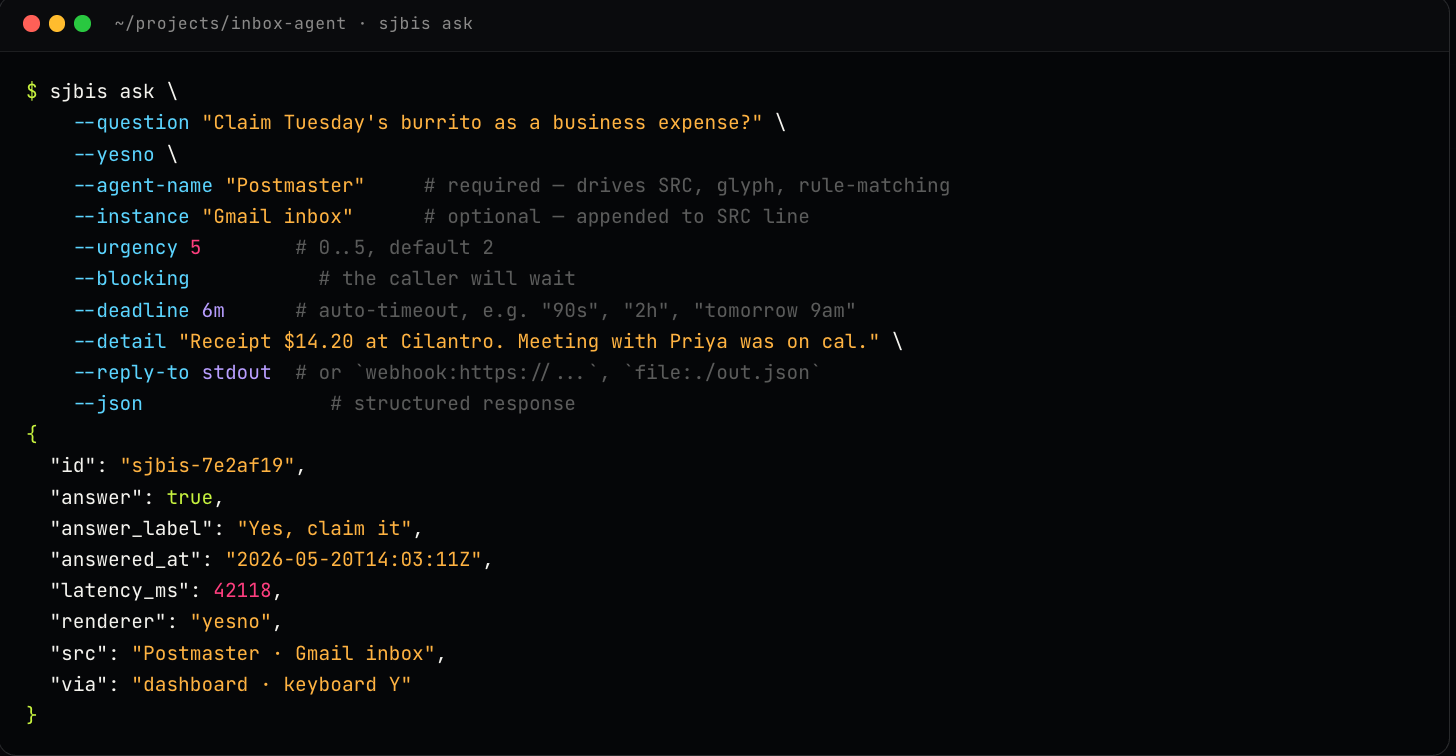
Claude’s design utilized a local SQLite. The only major change I requested is to switch this for PostgreSQL, with the idea being that I could use sjbis from anywhere. A bit of vibe coding with Kimi K2.6 (served via Fireworks.ai), referencing the design files from Claude design, and I quickly had a working project.
Armed with sjbis, AI agents could ask me a question by simply executing the sjbis command in their shell. sjbis would be responsible for getting that question to me and sending my response back. If it times out, the agent is instructed to use its best judgement, to tell sjbis what choice it made, and soldier on.
sjbis ask \
  --question "Approve deploy of PyForge v0.4 to prod?" \
  --yesno \
  --agent-name PyForge \
  --instance "Session s7b3d11" \
  --blocking \
  --deadline 1m \
  --json
# This will return a question id, and block until either
# (A) I answer the question or (B) the deadline is reached

# On timeout, follow the working agreement:
# apply your best judgement, then record it so the dashboard shows the auto-pick:
sjbis answer <id> --answer "Yes" --via caller-timeout \
  --note "No reply in 1m — proceeding; staging passed and prod is idle."
Key Lessons
1 - Be Near the Loop, but not In the loop
This is the whole point of sjbis, and is in general good advice. If I could summarize what sjbis enables, it is the ability to tell an agent:
Ask me for my input, but if I don’t answer within 5 minutes, use your best judgement and keep going.
This is what you want. When you are using many different agents, you don’t want one of them hanging for 25 minutes asking for your preferences on which argument-parsing library to use. For me, when I come back to a terminal and see it stuck, waiting for input for who-knows-how-long on a stupid question, it’s a painful experience. It is wasted potential.
I don’t have a great mental model for when agents stop to ask questions, and when they choose to soldier on. Both can have bad outcomes, but all things being equal I would rather the work get done. If I want to be involved, with sjbis I can be. I can bring the dashboard front and center and answer questions just as efficiently as with a CLI. Because multiple agents can call sjbis simultaneously, I can have several focused sessions at once, without constant tab switching, and without the possibility that I forget to check one and it stalls. By design, sjbis assigns different colors to different askers, so you can build up some muscle memory of who you are talking to.
2 - Have a prime command built in to your CLI tools
Having a well populated Skills or AGENTS.md is useful, but I find that managing them across many projects, and understanding the inheritance rules, and keeping them all up date and managed across multiple computers, gets cumbersome.
It’s much easier to type in to an agent:
run `sjbis prime` and use sjbis for all further communication with me
Then, you can maintain instructions to the calling agent for how to use the command. For all CLI commands, you should have a prime subcommand and a well populated --help to enable agents to understand how to use the CLI commands.
This prime command was inspired by similar commands in the beads and GasTown projects. Now every CLI I make has a prime command. You can then tell your AGENTS.md the following:
If you are using a non-standard CLI tool, check for the existence of a prime command and run that to see how it works. Run this prime command after compaction if you think you may use the tool again
3 - Have a upgrade subcommand
Managing versions across a server and multiple clients is tricky. You want to make sure that you have proper CI/CD setup, and then have an upgrade subcommand to get the latest stable version from an external source (e.g. Github releases). This used to be annoying drudge work to set up. Just tell your agent to do it. Note that having gh setup can make this really easy. Again, agents + CLI tools are the way.
4 - Agents + Custom CLI Tools = Endless Possibilities
sjbis is cool. Is it useful to anyone other than me? Maybe, but that doesn’t matter. The important thing is that it solved a problem for me, took minimal effort. Most importantly, a simple CLI was able to fundamentally change the way I interact with agents.
As fun as it would be to write custom plugins/integrations with Claude, OpenCode, Pi, Gemini, etc, that would be much bigger lift and probably not worth the effort. Handing an agent a CLI and telling it to figure out how to use it and then use it is much easier. There are so many other things that you can do using this pattern, limited only by your imagination.
5 - Use the infrastructure that you have, and AI to help you harden it
I recently bought an old Xeon server to use mainly as a dolt and PostgreSQL server for a different project. But, since I had a reliable and ultra-low-latency PostgreSQL box sitting around, I decided to use it. Because it’s running and already setup, I decided to also use it for a Github runner. Pre-AI, I would probably have decided to just put up with the free Github runners, even though they are a bit slower. This is because dealing with the rigamarole of setting up a Linux runner, and getting all of the actions setup was annoying. Now, I just type in an OpenCode session:
homestar-runner is a Github runner on this network. Make it work with this project. Get CI/CD to work, and have homestar-runner build the linux versions. You also have passwordless ssh access to sjbmbp.local. Get that setup as a Github runner and use it for the Apple Silicon builds.
It did its thing, burned through some tokens, and it’s working now. I think that we forget that this would have been a 2+ hour diversion just 2 years ago. Now, thanks to AI, all of these loose ends and side quests just get done, while I get to focus on the main work (or another side quest).
Or, as stated quite succinctly on the recent When AI Builds Itself blog post on Anthropic’s blog,
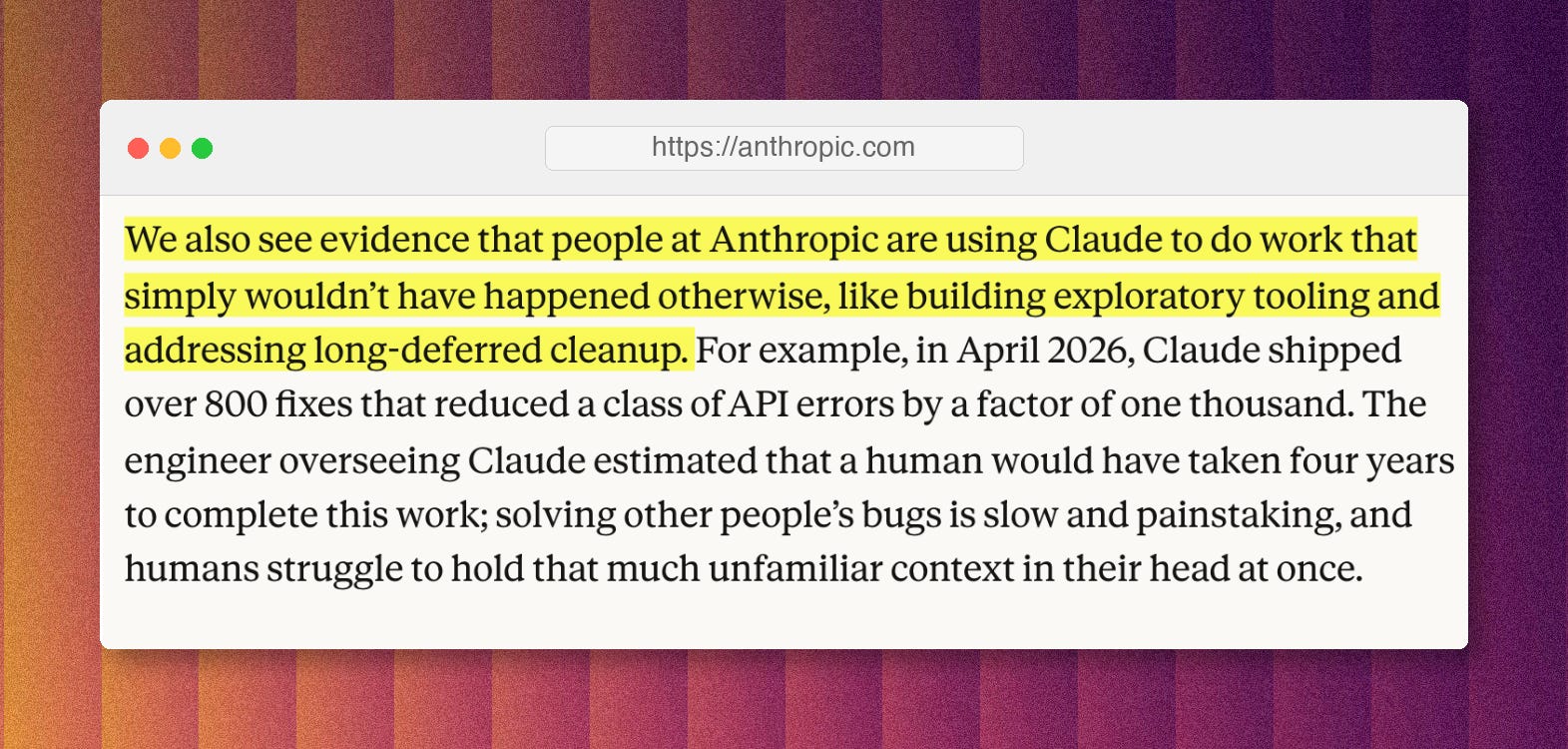
Use AI to get done all of this drudge work, and utilize all of the great tooling that we have built up.
Resources
My repo is here. Have fun!