

First Contact With Hyperframes
I Cloned It, Sent a Few Prompts, and It Just Worked

I cloned Hyperframes one evening to see how it worked. A few prompts later I was watching an 8-beat explainer render, a piece I could not have produced by hand in a week. So I made another. And another. Different topics, different prompts, and at one point a different methodology entirely. The throughline wasn't my cleverness. It was that the output kept coming out good.
That's the story I actually want to tell. Not "look at this one clever pipeline I built," but the more uncomfortable, more useful observation: I gave an unfamiliar framework a few sentences and it just worked - repeatedly. This is me trying to figure out why.
Context
I run a content pipeline as part of the Trilogy AI CoE. The tool uses the articles that we write to create infographics, carousels, explainer videos, the usual amplification surface. The video bit had been the weakest link. I'd been using a templated renderer that was fine for consistency and terrible for creative range. Every explainer looked like every other explainer.
A colleague @Leonardo Gonzalez pointed me at Hyperframes. I read the README, registered the obvious selling points, HTML-native, deterministic, agent-first, and made a note to "try it out." Then I noticed the line that actually mattered:
Install the HyperFrames skills, then describe the video you want.
The framework ships its own Claude Code skills on purpose, installable with npx skills add heygen-com/hyperframes. You're not supposed to learn the framework first and then write video code; you install the skills and ask your agent to make you a video. The friction model is closer to "talk to a director" than "learn a new SDK." I had a free evening, so I tried it.
"It Just Works": and That's the Interesting Part
Here's what I mean concretely. Across a handful of evenings I produced several finished videos:
A ~30-second manifesto explainer for Synapse-OS, an internal product concept (it landed at 36 seconds once the narration was timed). Eight beats, custom motion, on-brand palette.
A 90-second LinkedIn explainer for a @praveen koka's **OpenClaw** article ("skip the $600 Mac mini"), square format, narrated, captioned, a companion to a carousel we'd already shipped.
I built those two with different workflows (more on that below). One leaned on the framework's own capture-to-video skill; the other ran a full software-engineering methodology. I didn't plan that contrast, it's just what happened as I poked at the tool. And the punchline is that both came out genuinely good. Not "good for AI." Good enough to ship on the company Substack and LinkedIn without apology.
When the same person gets reliably strong output from two different paths into the same framework, the quality isn't coming from the path. It's coming from something underneath both of them. That something is the combination of skills that encode structure and a framework that renders deterministically. The prompt, the thing most people obsess over, is the layer doing the least work.
What's Actually Underneath: Skills, Not Prompts
Whatever path I took, the agent was never improvising from a blank page. It was following a skill, a packaged set of instructions that turns "make me a video" into a sequence of gated steps with real artifacts. Two paths I actually used:
Path A: the framework's own skill: website-to-hyperframes
This is what produced the Synapse-OS video. It's a Hyperframes skill with a 7-step pipeline where each step gates the next:
Capture & understand the source (a site/page): print a summary before continuing.
Write `DESIGN.md`: a brand cheat-sheet (palette, fonts, components).
Write `SCRIPT.md`: the narration; scene durations come from the narration, not from guessing.
Write `STORYBOARD.md`: per-beat creative direction: mood, motion, transitions, asset audit.
Synthesize narration (local Kokoro TTS, no API key) + word-level transcript.
Build the compositions: one HTML beat at a time.
Validate & deliver: render, then check actual frames against the storyboard.
The point: the structure I'd normally have to impose by hand is baked into the skill. I described what I wanted; the skill made me answer the questions that matter (what's the story, what's the palette, how long is each beat) before any code got written.
Path B: a full methodology layer: Superpowers
This is what produced the OpenClaw video. Superpowers is Jesse Vincent's (obra) Claude Code plugin, a general software-development methodology, not video-specific. When it runs, it adds rigor on top of whatever you're building:
`brainstorming`: a hard gate: no code until a design doc exists and you've approved it.
`writing-plans`: turns the design into an explicit, checkbox implementation plan you can read and push back on.
`subagent-driven-development`: dispatches a fresh subagent per task with only the context that task needs, then runs two reviews (spec-compliance + code-quality) before the task counts as done.
`verification-before-completion`: won’t let the session end on "the script returned 0"; it makes you confirm the real artifact.
You can see the receipts: the OpenClaw build committed its design spec and implementation plan to docs/superpowers/, and the plan literally opens with "REQUIRED SUB-SKILL: Use superpowers:subagent-driven-development." The sibling repo has the scene modules, tests, and frame snapshots that flow from that discipline.
The honest comparison
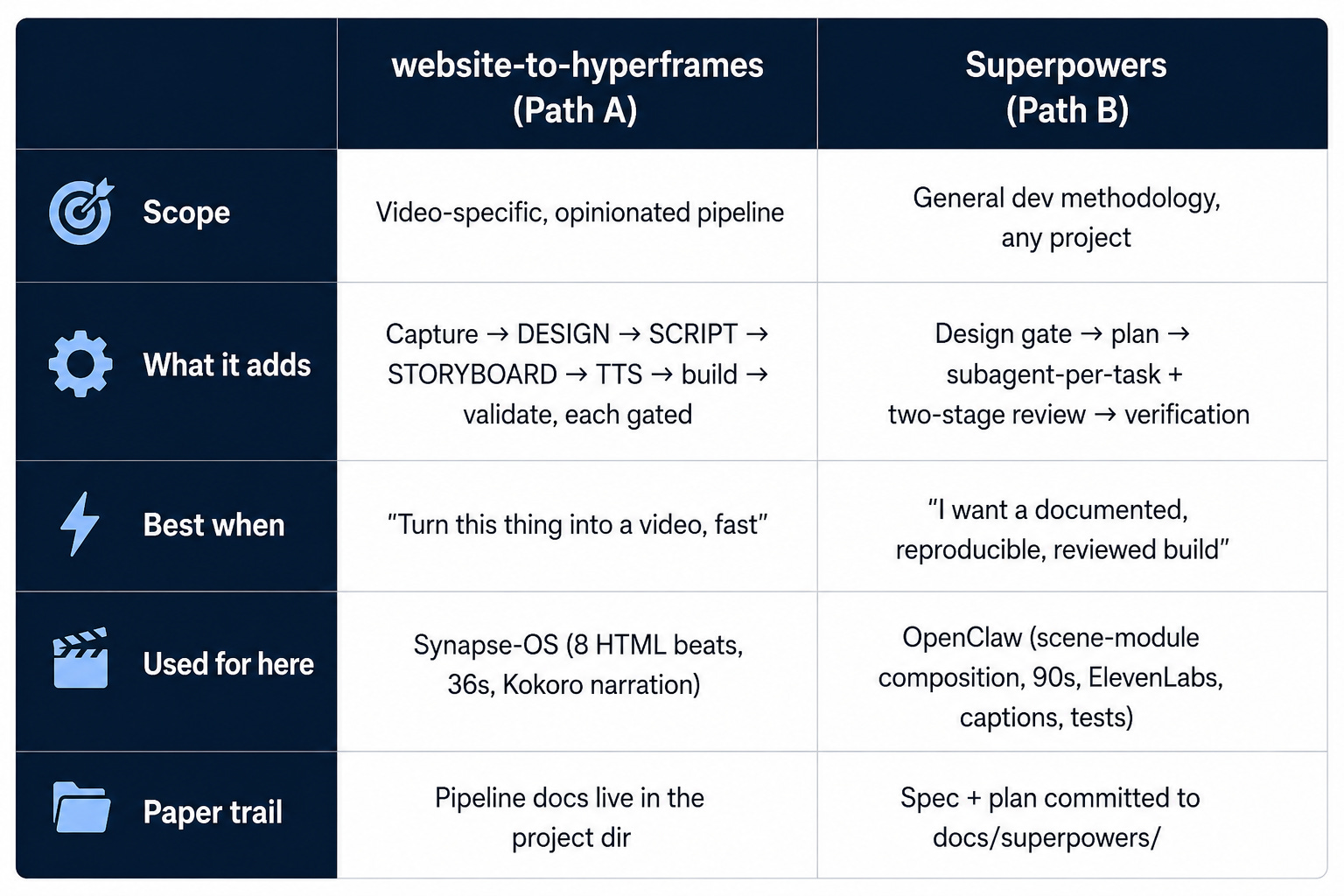
Different amounts of ceremony; same outcome quality. That's the thing worth internalizing: I didn't need the heavy methodology to get a great Synapse-OS video, and I didn't need to hand-tune the OpenClaw video despite its extra rigor. The skill, whichever one, did the structuring.
What Hyperframes Itself Is Doing
Both paths sit on the same framework contract, and that contract is the other half of why the output is reliable:
Each beat is just HTML.
beat-1-question.htmlis a standalone composition I can open in a browser. No bundler, no build step. The same file the renderer consumes is the file the agent wrote.GSAP runs paused. Each beat builds a GSAP timeline, registers it on
window.__timelines, and never calls.play(). The engine seeks the timeline toframe / fpsbefore each capture, so a 5-second timeline plays across exactly 5 seconds of video. The skills also enforce deterministic motion; Synapse beat 1 carries an explicit// no Math.random — use hardcoded delay pattern, because anything stochastic would render differently frame to frame.The CLI gates the work.
npx hyperframes lintis a static structural check (missingdata-start, mis-typedclass="clip", undeclared duration);npx hyperframes validateruns each composition in headless Chrome to catch real JS errors before render. Cheap, fast, explicit, a beat isn't "done" until it clears both.The render is deterministic. Same input = identical output. On Linux with
chrome-headless-shellit uses BeginFrame mode for atomic frame capture; on my Mac it fell back to screenshot mode automatically and warned me. Either way the output was correct.
The combined effect: the agent's work surface is small and tight, write an HTML file that lints and validates. The framework hides the rest.
The Synapse-OS Build, in Concrete Terms
Here's what's actually on disk for that video, and the interesting part is how little of it is "scaffolding":
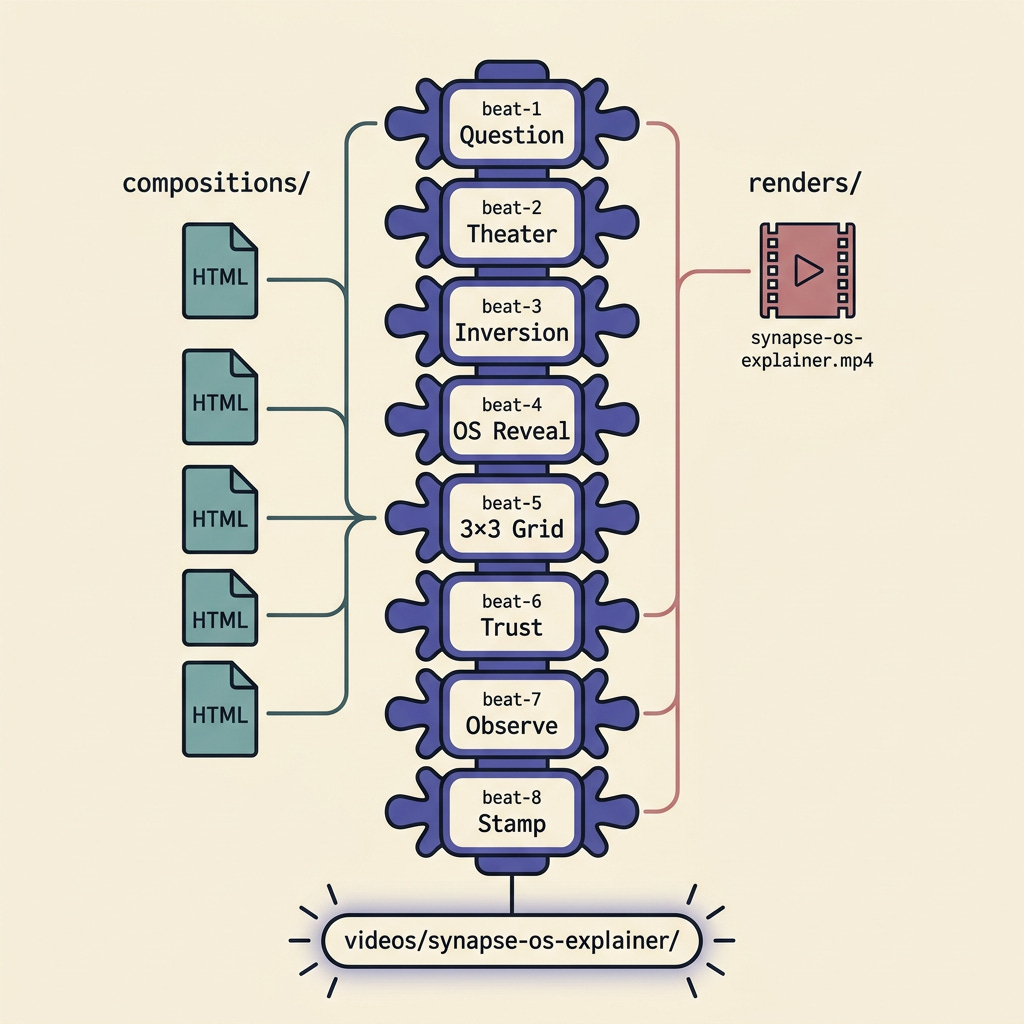
website-to-hyperframes produces DESIGN.md, SCRIPT.md, and STORYBOARD.md as gated artifacts during the build, but what persisted in this folder is the eight beats and the render, because the design system, the script, and the timing all live inside the compositions:
The design system is applied, not just documented. All eight beats share the same palette down to the hex value, cream (
#FDFCFA), ink (#08090B), signal-green accent (#008942), with a consistent gray ramp and a JetBrains Mono / Inter Tight type pairing. There's nothing to drift from; the system is the consistent application.The script is the composition. Beat 1's narration is rendered as word-by-word kinetic typography, "Your team talks about AI constantly. Can you name what they shipped last week?", over 26 hand-placed tool-name chips (ChatGPT, Cursor, Claude, MCP, n8n…) that fade in deterministically and vacuum inward on the cut to beat 2.
The timing is in the data. Each beat's
data-duration(beat 1 is 5.21s) and per-element GSAP offsets are the storyboard; the eight durations sum to the 36-second render.
None of that is template fill. It's art-directed, and I didn't art-direct it line by line. I answered the skill's questions and watched it build.
What Surprised Me
1. The bottleneck was *me*, not the agent. Both paths force creative decisions you'd normally outsource to the model, tone, palette, narration or silence, beat count. It's slower than typing a one-line prompt, but the result is that I'm directing a video instead of accepting whatever the model felt like making. The decisions are mine; the execution isn't.
2. I never had to learn the framework. I touched zero Hyperframes internals. The skills knew the GSAP conventions (paused, registered on window.__timelines, data-start/data-duration on every scene, no visibility:hidden on wrappers) and applied them without me asking. My job was the story, not the engine.
3. The quality didn't depend on the ceremony. This is the one that made me revisit my whole production pipeline. The lighter path (website-to-hyperframes) and the heavier path (Superpowers) both cleared a bar my templated renderer never could. If a few prompts into an unfamiliar framework beats a renderer I'd been tuning for months, the renderer wasn't a floor, it was a ceiling.
What I'd Tell Someone Evaluating Hyperframes
Install the skills first.
npx skills add heygen-com/hyperframes. The framework is technically usable without them; the experience is meaningfully worse. The skills aren't a tutorial, they're the contract.Pick your ceremony to match the stakes. For a fast, on-brand explainer, the framework's own
website-to-hyperframesskill is enough. For something you want documented, reviewed, and reproducible, layer a methodology like Superpowers on top. Both work; they cost different amounts of your time.Don't skip the design step, whichever path you're on. The temptation is to type "make me a video about X" and let the agent figure it out. You'll get something. You won't get your something. The skills make you spend ten minutes deciding first, that's the feature, not the friction.
Watch the render before declaring victory. Validate catches most authoring bugs, but "the tests passed" and "this is the video I wanted" are different sentences.
What's Next
This started as a tool evaluation. It became the trigger for a substantial rewrite of my production video pipeline at Amplifier, moving from a hard-coded template renderer to a worker-authored composition loop that calls the same Hyperframes skills I used locally. That's its own case-study series; the short version is that the quality bar these evenings hit was so far above the template that the rewrite stopped being optional.
The thing I want to leave with isn't about Superpowers, or even about Hyperframes specifically. It's the stack:
A framework is a contract. Hyperframes is a good one.
A skill is encoded structure, whether it ships with the framework (website-to-hyperframes) or with a methodology (Superpowers). It's what turns "make me a video" into a sequence of decisions and gates.
A prompt is what most people give an agent today, and it's the layer doing the least work.
"It just works" isn't magic, and it isn't the prompt. It's that the structure I'd normally have to supply by hand was already encoded in the skills, so a few sentences and a deterministic renderer were enough to produce something I'd actually ship. Swap the methodology, keep the framework, and it still works. That's the part worth stealing.
References:
Hyperframes:
heygen-com/hyperframes(GitHub)Superpowers: Jesse Vincent's plugin,
obra/superpowers(GitHub)
Example Output:
David Proctor is VP of AI at Trilogy. He writes about AI infrastructure, agent protocols, and what actually works in production.