

CLI Tools vs MCP
Which is better and when?


AI + Tools? What do you mean?
You are making a tool for your AI to use. You have a set of requirements:
Make it usable from any coding CLI (Claude Code, OpenCode, Codex)
Make it usable from IDEs (Cursor, Windsurf, and Antigravity)
Support various authentication mechanisms
Have global state, even with multiple users
Make it upgradeable
It sounds like MCP would fit the bill. But, in this article I am going to submit to you that the humble command line tool will do most of what you want, be easier to maintain, and simpler in the long run.
MCP is(was?) All the Rage
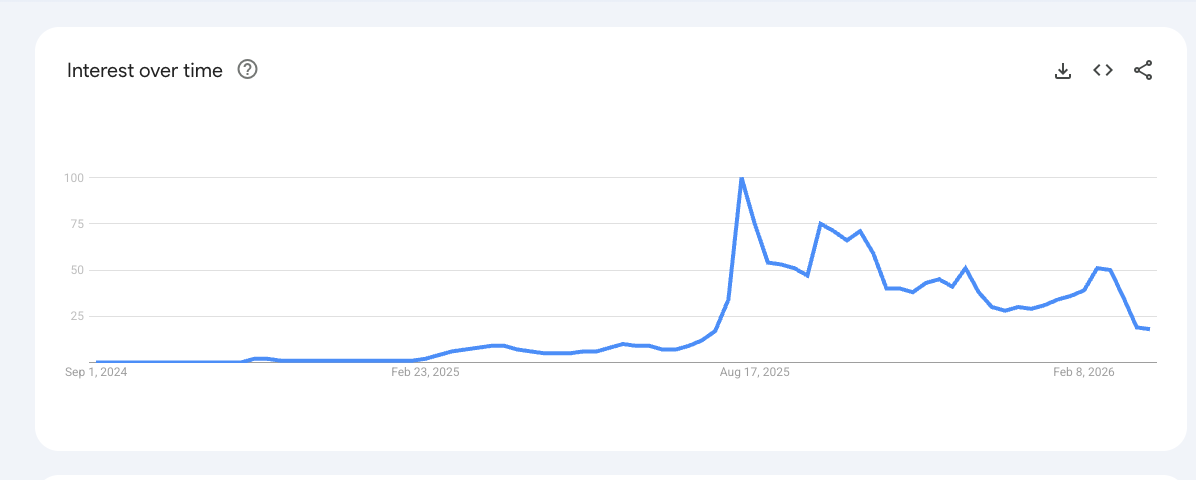
MCP took the AI world by storm in mid 2025. Before MCP, getting an AI to use an external tool like an API was tricky. Different models and frameworks had their own approaches. I remember trying to get a Swagger JSON document just right so that ChatGPT would be able to call my API, and it was awkward and cumbersome. And, it felt like an accumulation of technical debt, because you were building towards a particular model or framework.
MCP was like the USB-C of AI tools. You could basically plug anything into anything and it would ‘just work’. But then, the cracks started showing…
The Difficulty with MCP
Continuing with the USB-C analogy, MCP was great but there were little incompatibilities. Just like there is some serious confusion about types of USB-C cables, MCP is not a universal solution. Here are some issues that quickly surfaced:
Enabling an MCP server added an enormous amount of tokens to the context. As an example, the Github MCP was server is reported to add 55K tokens to the context (although they have worked to reduce this to about 23K tokens).
MCP has 3 transport mechanisms, and it took some time for every combination of transport and tool to ‘just work’
MCP didn’t have a great auth story. Sometimes it depended on an environment variable.
Many MCP servers were hosted with Docker, and the container management wasn’t good. I had the Perplexity MCP server installed, and my system would accumulate hundreds of stopped containers.
*Note - for the rest of this article, when I am talking about an MCP Server, I am talking about a remote server, and not running an MCP server locally, although many of the same arguments apply.
The Unix Tool Philosophy
Unix has been a great system because of the philosophy of having many small, sharp tools. Think ls, grep, df, ps, etc. ls does not pretend to be a file management system, df won’t organize your files, and grep will do a lot, but all in the name of searching. Each of these tools has a well defined purpose and scope.
These tools are also self-documenting. Through --help, it is possible to learn what tools do. Subcommands and arguments can change the behavior of a tool. And, you can nest subcommands arbitrarily. Infamous for this is the aws cli, which has commands for each service, and subcommand, subsubcommands, etc. Each of these subcommands can have their own --help page leading to a gradually-revealing, explorable documentation system.
These tools are composable. It used to be the hallmark of a Linux expert to quickly stitch together commands to accomplish incredible tasks. Finally, they are local and available everywhere.
A Quick Case Study - aicoe.fit
I needed a link shortener for my team. There are many link shorteners. This one is mine. The requirements of this link shortener were simple. For every article on this very sub-stack I want each team member to have a customized short link that they could share on any channel and track however they wanted to. For example, if I am sharing my Gastown article on Discord, I want to track it to see the impact of that share. But, I also don’t want to share an ugly link with a bunch of utm parameters. Something like:
https://stephenbarr.ai/my-story?utm_source=discord&utm_medium=referral&utm_campaign=personal_branding_launch&utm_term=ai_agents&utm_content=sidebar_link&utm_region=na-west&utm_device=macbookpro&utm_browser=chrome112beta&utm_user_segment=tech_founders&utm_experiment=variant-B&utm_tracking_id=8475fd9aa3bb&utm_cookie_consent=partial&utm_email_hash=ae4b33f9a2c&utm_retention_goal=90days&utm_pixel=facebook-google-tiktok-all&utm_internal_notes=please_dont_remove_this&utm_ref=kjr93hta#trust-me-its-safe
I would much rather share something like https://aicoe.fit/the-prius-of-gastown-192a5a and hide all of that ugliness.
Finally I wanted all of my team members to have access to this tool. The question was: do I distribute this as an MCP server or as a command line utility? I decided on a CLI. For the infrastructure, I decided on Supabase. This gave me a Postgres database, Edge functions, integrated Google authentication, and (ironically) access to the excellent Supabase MCP server.
The tool itself
als
    ├── authors
    ├── custom-links
    │   └── [--count INTEGER] [--all]
    ├── last [N]
    │   ├── [--author TEXT]
    │   └── [--me]
    ├── login
    │   └── --api-key TEXT (required)
    ├── search QUERY
    │   └── [--count INTEGER]
    ├── set-author-name NAME
    ├── shorten URL
    │   └── [--source TEXT]
    ├── stats
    ├── sync-substack
    │   └── [--force]
    ├── tracking-variants
    │   ├── list
    │   ├── add
    │   │   ├── --source TEXT (required)
    │   │   ├── [--label TEXT]
    │   │   ├── [--medium TEXT] (default: social)
    │   │   ├── [--content TEXT]
    │   │   ├── [--term TEXT]
    │   │   └── [--icon TEXT]
    │   └── delete
    │       ├── [--label TEXT]
    │       └── [--source TEXT]
    ├── upgrade
    │   └── [--force]
    └── whoami
As you can see from the command tree, you’ve got everything you need. Based on this tree. This is where I find bash CLIs to be really amazing. Here is a prompt to OpenCode backed by Kimi K2.5:
use the als cli.
Figure out how it works with --help.
Get me the discord share link for my latest article,
and also for leonardo's most relevant article to QWen3
This is a sloppy and terrible prompt. Here are the results in realtime. Note that the actual work happened when I pressed Enter at 0:07, and it was done at 0:20.
Using als —help, Kimi K 2.5 figured out that there was a search subcommand, as well as tracking variants, and then figured out the right thing to do. I didn’t have to deal with authentication because my API key was saved to a dotfile.
The API key came from its very simple companion web site. This website was 100% vibe coded and the main purpose of its existence is to allow Google Authentication and to supply API keys for the CLI. I don’t want to mess with Google Auth.
Best Practices Making a CLI App Optimized for AI Tools
Implement it in the language that you are most comfortable with. I chose Python because it is what I know.
Have a set of subcommands
Use AWS-style identifiers rather than UUID4’s
Make sure that all subcommands have a
–helpInclude a self-upgrade method.
Architecture:
Website:
Sign in with Google Auth
Nice UI and visualizations
Most importantly: You get an API Key here.
Hosts LLM-optimized instructions
CLI
Reads API key in ~/.config/{my-tool}/creds.toml
Have subcommands:
Last N articles
The “Get the API key from the website and add it to a config file” pattern is very useful. I have some documentation of it here that I reuse across projects.
Using Coding Agents
Update your AGENTS.md
FILE: AGENTS.md
- If you are adding functionality to the website, then also add it to the CLI.
- If you are adding functionality to the CLI,
  then ask me if I want to add it to the website
Use the Supabase MCP server
As a quick aside, I LOVE the Supabase MCP server. It is an example of MCP done right. It has a useful set of tools, but using it does not seem to take up an inordinate amount of tokens. Its pretty cool to be able to add columns, do SQL migrations, and deploy edge functions easily from within an AI agent. Using the Supabase MCP server when developing your Supabase-backed CLI tool will make life easier for you.
Counterpoint - When to Use MCP
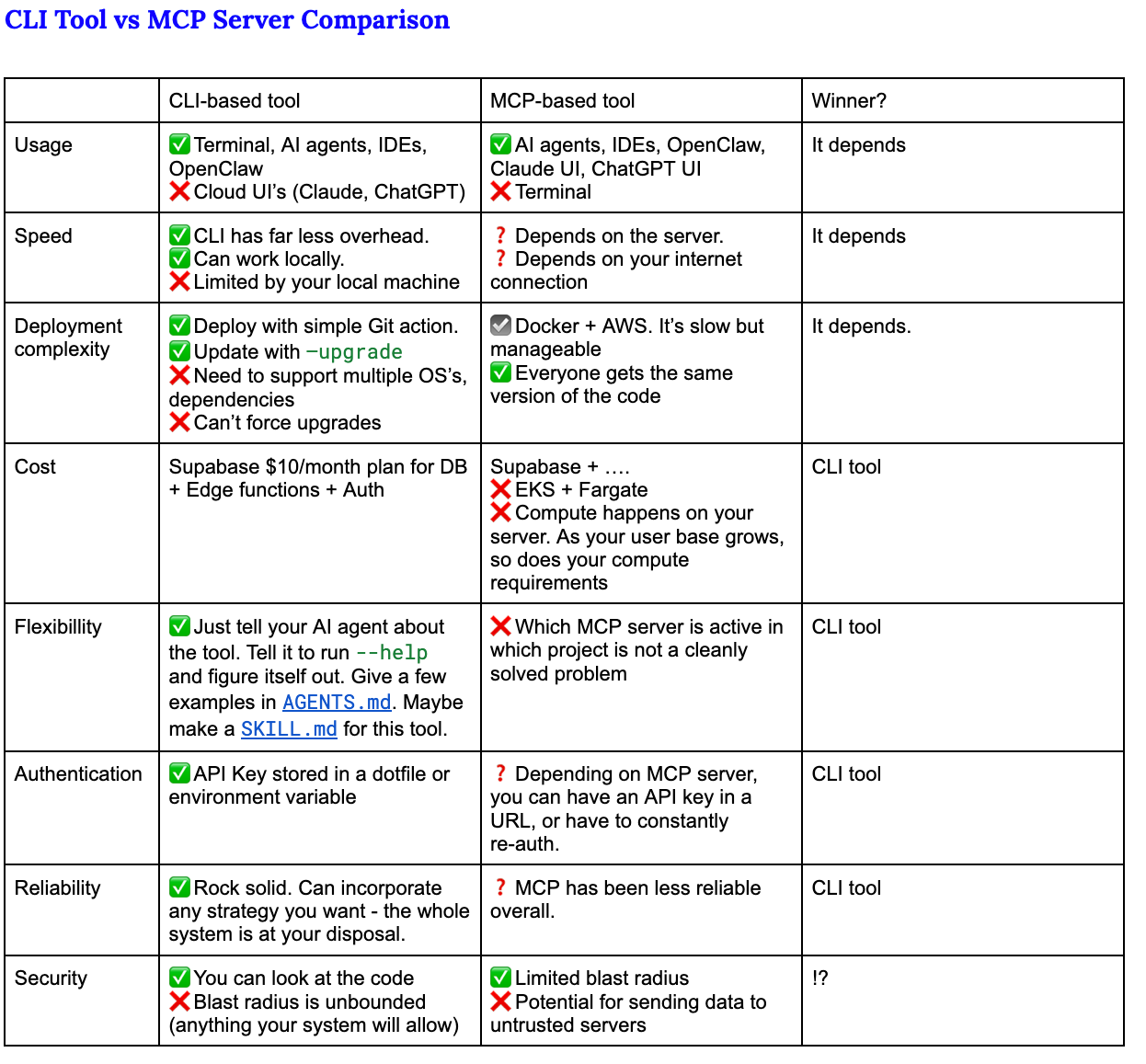
Based on everything I’ve said above you would think that I am a complete MCP doomer. I’m not. Here is a list of situations where MCP makes sense:
You are handling large assets like images and videos and the finished product is small relative to the inputs.
You are doing computing in an environment that you need absolute and total control over. E.g. dependency management, particular architectures.
Your users are highly non-technical.
You cannot run the risk that your users have access to older versions of the code (the cli could auto upgrade itself but that’s not always great).
You are Supabase and have the ability to make a kickass MCP server
Advice
Start with the CLI. Prove out your use patterns. You can iterate A LOT faster using a CLI tool than you can with an MCP server.
Using a CLI feels far less brittle.
You can use your CLI tool manually at the terminal. You can trivially incorporate your CLI into non-AI workflows such as bash scripts.
Managing access to a CLI program is easier
Use Github releases to mint new versions, and have a upgrade subcommand on your CLI. You can make a very painless install process using the standard
curl -fsSL example.com/install | bashUse Supabase + CloudFlare for a very simple website which handles authentication. Make that webpage give you an API key.
Great Examples in the Wild
Here is a list of CLI tools that work great with AI agents.
Beads – Git-backed issue tracker that gives agents durable task memory and dependency graphs they can query and update from the shell. Repo: https://github.com/steveyegge/beads
rtk – “Rust Token Killer” proxy that compresses command output (git, tests, docker, etc.) before it hits the model, cutting terminal token usage by 60–90%. Repo: https://github.com/rtk-ai/rtk
gh (GitHub CLI) – Scriptable access to issues, PRs, reviews, and releases so agents can manage GitHub workflows via commands like gh pr list and gh issue create. Repo: https://github.com/cli/cli
jq – Lightweight JSON processor that lets agents filter and reshape API responses and logs with concise expressions, keeping downstream context small and focused. Site: https://jqlang.org
agent-tui – TUI automation layer that lets agents drive terminal apps by capturing the screen and sending keystrokes, making curses-style tools usable from LLMs. Repo: https://github.com/pproenca/agent-tui